
Rail replacement,
from request to report
Whether the work arrives as a possession timetable, a railbus shift file or an occupation plan, Busable builds the duties, puts the route on the driver’s tablet and tracks every bus through to the report. For bus and coach operators in New South Wales, Queensland and Victoria.
Choose your state to see how it works there
New South Wales
Queensland
Victoria
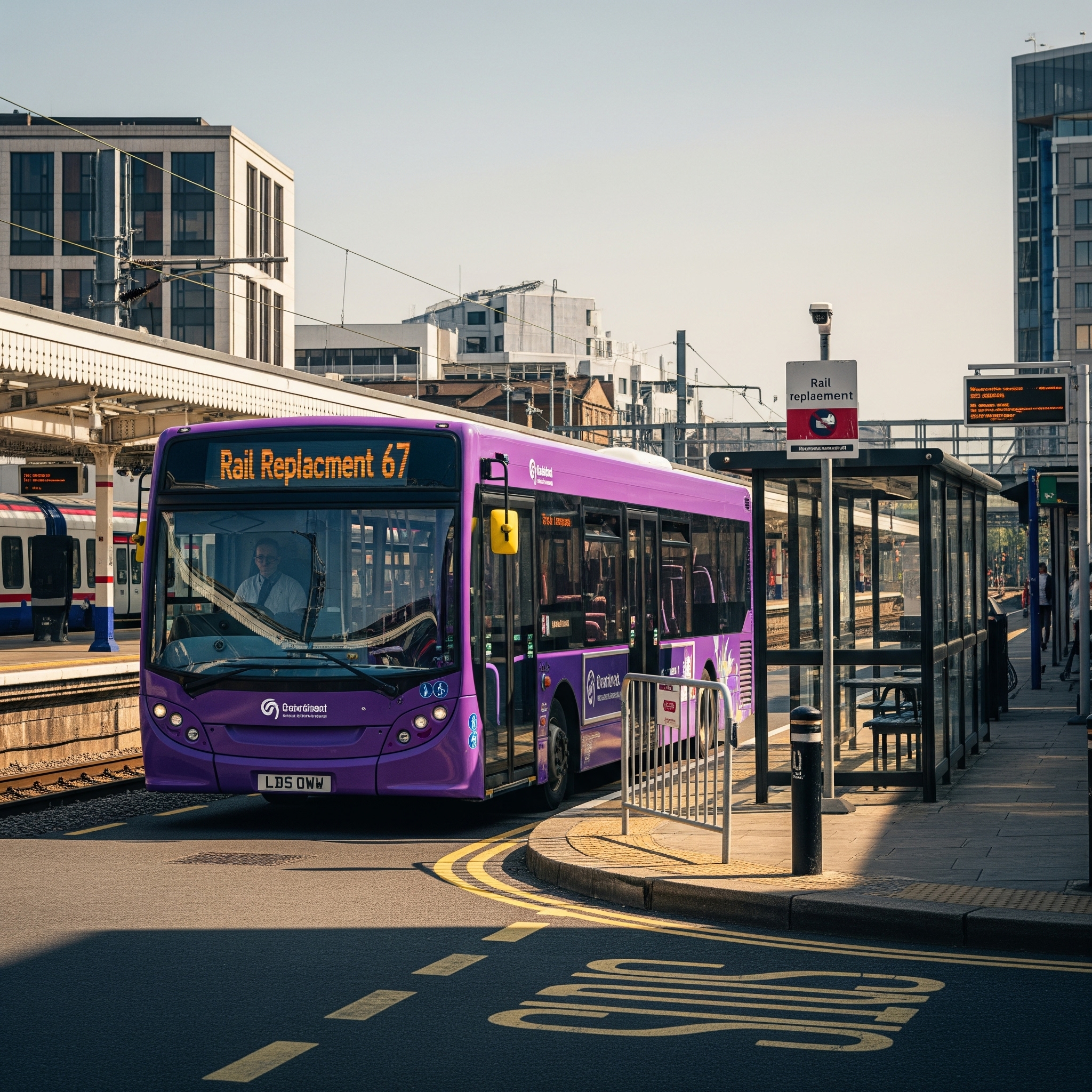
The closure is planned. The work reaching your depot isn’t.
The track closure is scheduled months out, but the work lands at the depot with days to spare: a bussing request, a PDF of driver shifts or a replacement plan. Then it moves. Shifts get handed back, closures get extended, a stop shifts a street. Every change goes back through the same manual process: someone keys it into the scheduling system, one shift and one trip at a time.
Drivers are reluctant to take the work, because the route is made up for the closure, along streets no bus normally uses. And once the buses are out, the depot has little view of where they are or whether they’re running to time, and the report the agency asks for gets pieced together afterwards.
One system for the whole job
Most tools solve one piece of this: a scheduling package, a printed run sheet or separate navigation app, another system for tracking, and a spreadsheet for the report. Every handover between them is a place for a trip to go missing.
Busable runs the whole rail replacement job in one system, from planning and scheduling through dispatch, operations, tracking and reporting. The trip Able AI™ builds is the trip on the driver’s tablet, the trip on the depot’s live map, and the trip in the on-time report and the Shift Trip Matrix. Nothing is re-entered between stages.
1. Plan and schedule
2. Dispatch and operate
3. Track and report
How the work arrives, state by state
The closure has a different name and a different paper trail in each state. The job of running it is the same.
| New South Wales | Queensland | Victoria | |
|---|---|---|---|
| Local term | Possession | Track closure, run by railbuses | Occupation |
| Who arranges it | Transport for NSW, through the Contingent Bussing Contract (CBC) panel | TMR arranges the capacity. Queensland Rail schedules the closures | Metro Trains Melbourne for buses, V/Line for regional coaches through a statewide panel |
| How it reaches you | A bussing request with the published possession timetable | A PDF shift file. The railbus routes and timetables come from the Queensland Government’s data feeds | A replacement plan from the rail operator, often already built and blocked |
| What Busable does | Able AI builds the trips, route path and duties. You authorise the TODIS file to Transport for NSW, within 24 hours of the request | Able AI reads the shift file and drafts the duties, leaving out standby shifts, then runs a fatigue check | Able AI turns the plan into duties your drivers can legally run |
1. Plan and schedule: Able AI does the build, you check it
However the work arrives, Able AI does the data entry. It reads the possession timetable, the shift file or the plan, matches every trip, builds the duties and the dead runs between depot and corridor, and sets out what it found before it creates anything. Once you confirm, everything is saved as a draft and a fatigue check runs across every duty. When a closure is extended or a shift is handed back, the revised file goes through the same way.
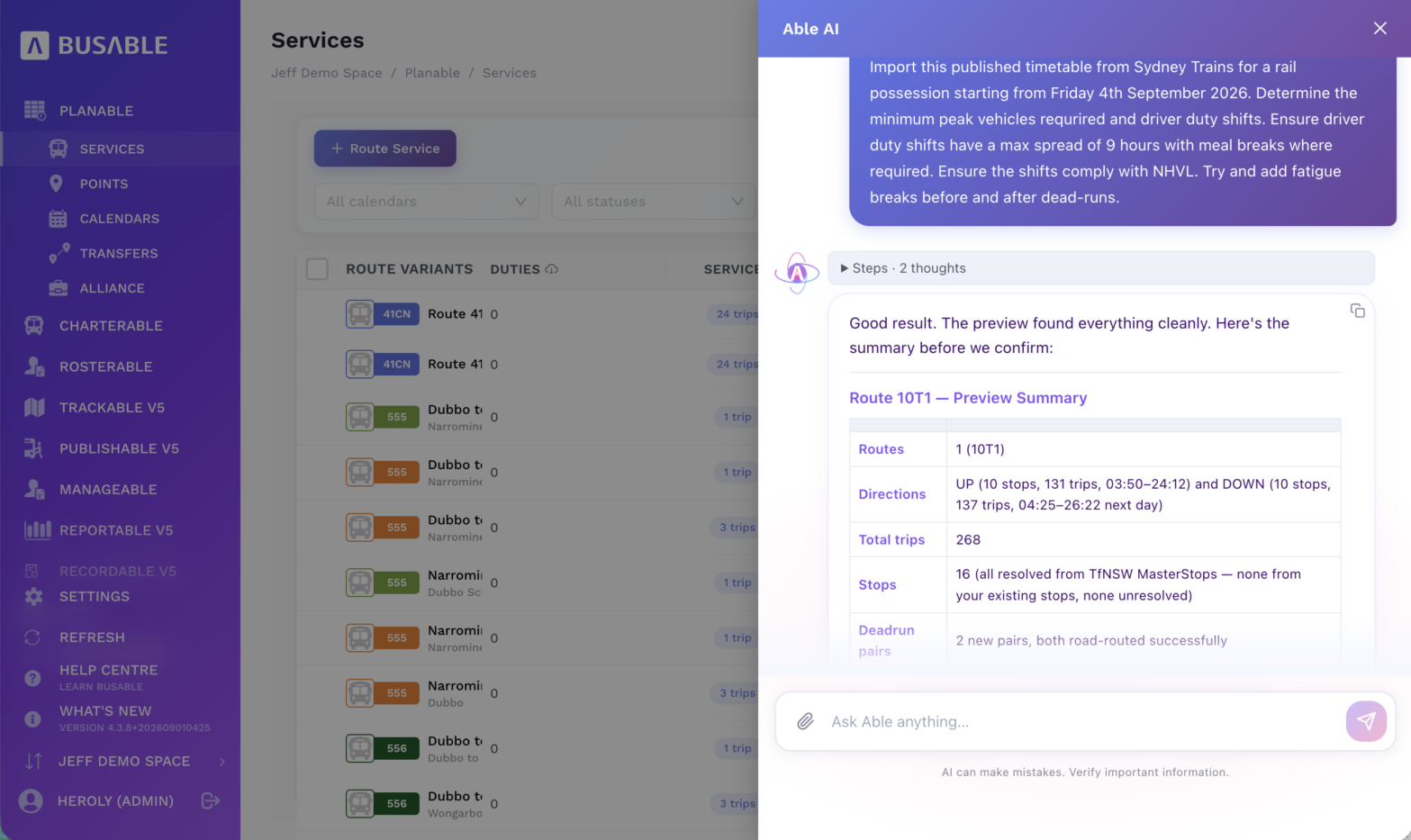
In New South Wales, one instruction and the published possession timetable come back as a preview of every trip, with the stops resolved, before anything is created.
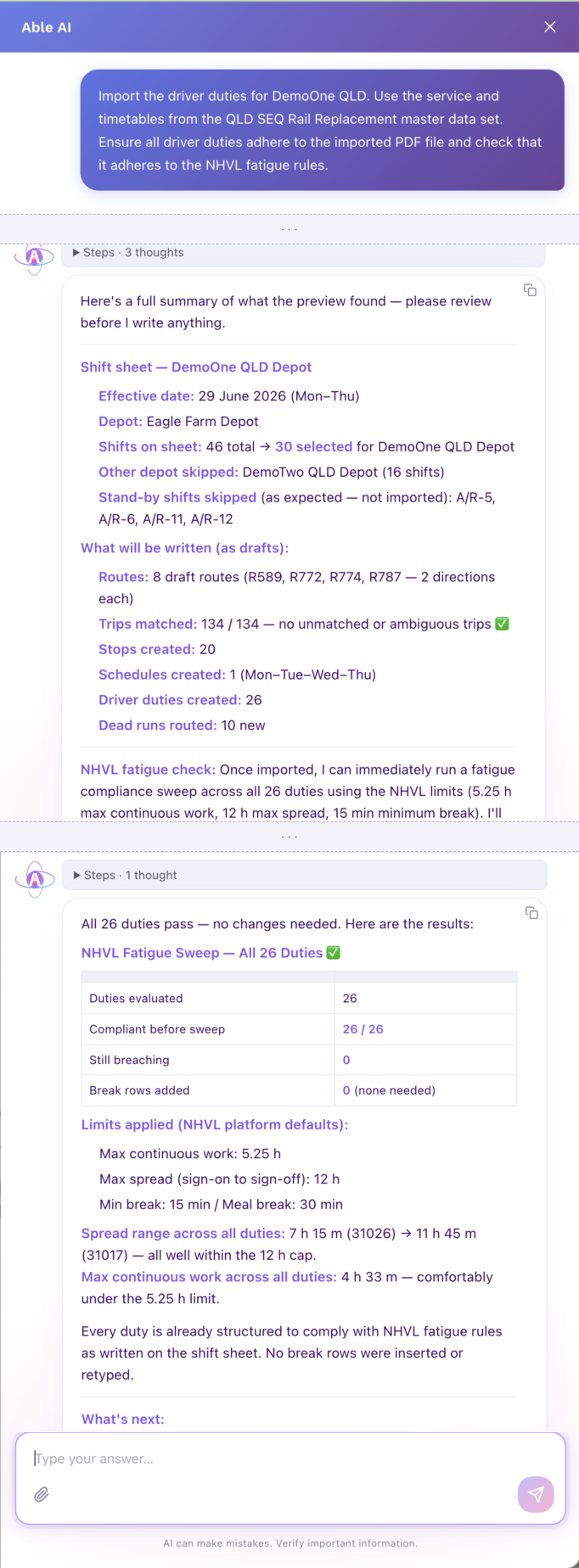
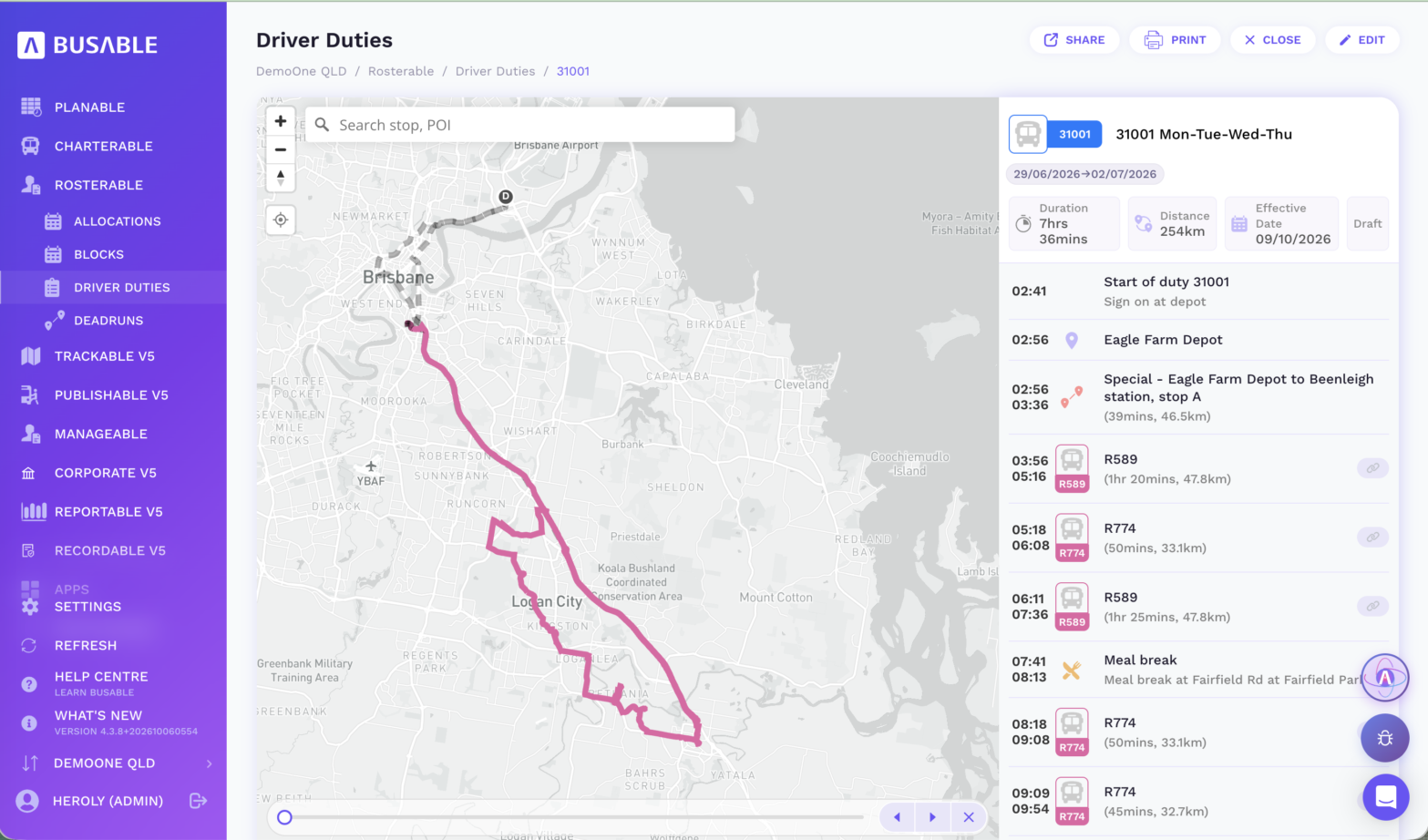
In Queensland, Able AI reads the railbus shift file, takes the operator’s shifts, leaves out the standby shifts and the other operator’s shifts, matches every trip to the government’s railbus timetable and drafts the duties.
2. Dispatch and operate: the replacement route on the driver’s tablet
The checked duties go on the roster board like any other work. Any duty without a driver or a bus is flagged before the roster is published. From there, this is what the driver sees.
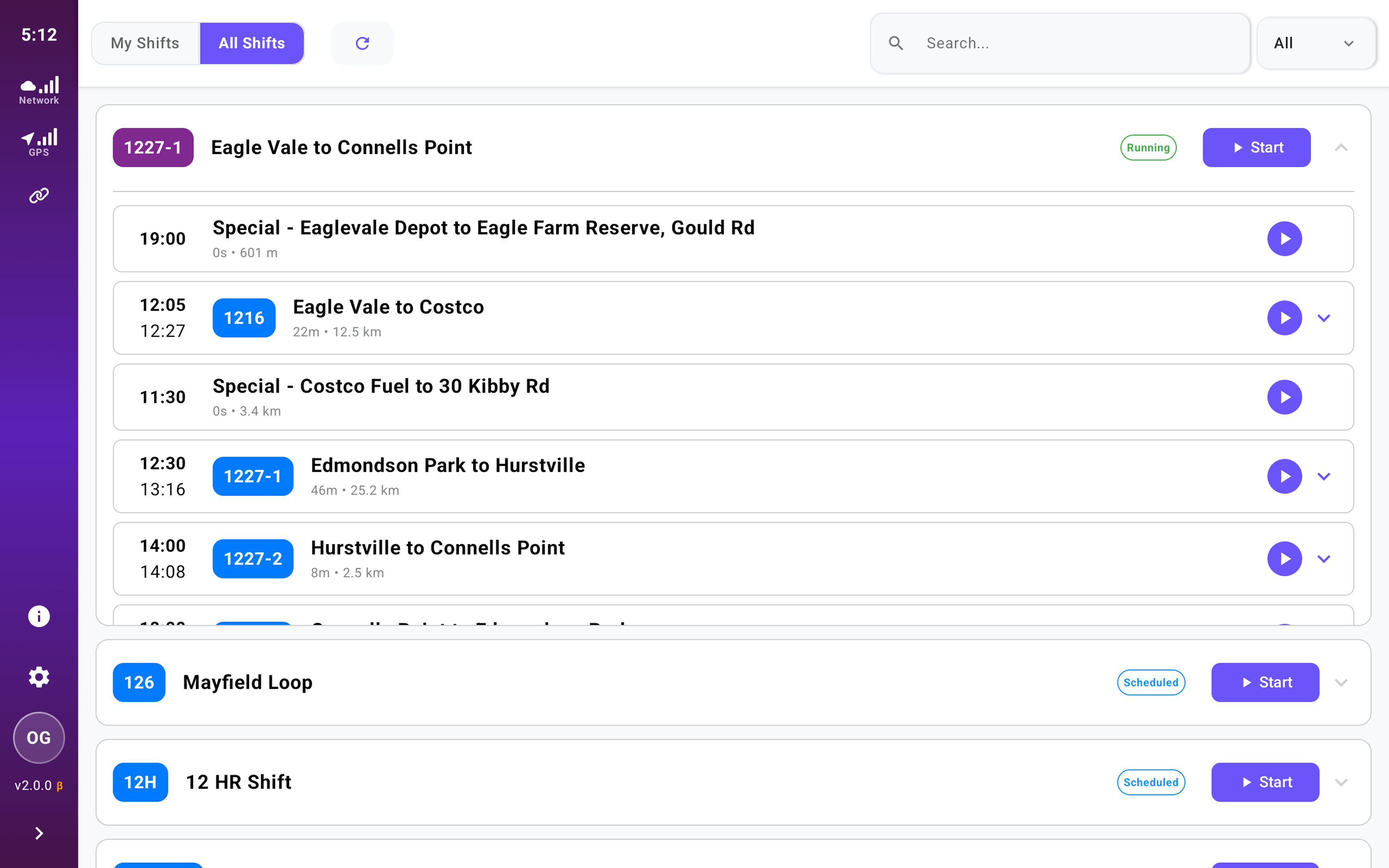
The driver signs in on the tablet in the cab and selects their name and vehicle. The replacement duty is listed with every trip in order, with times and distances.
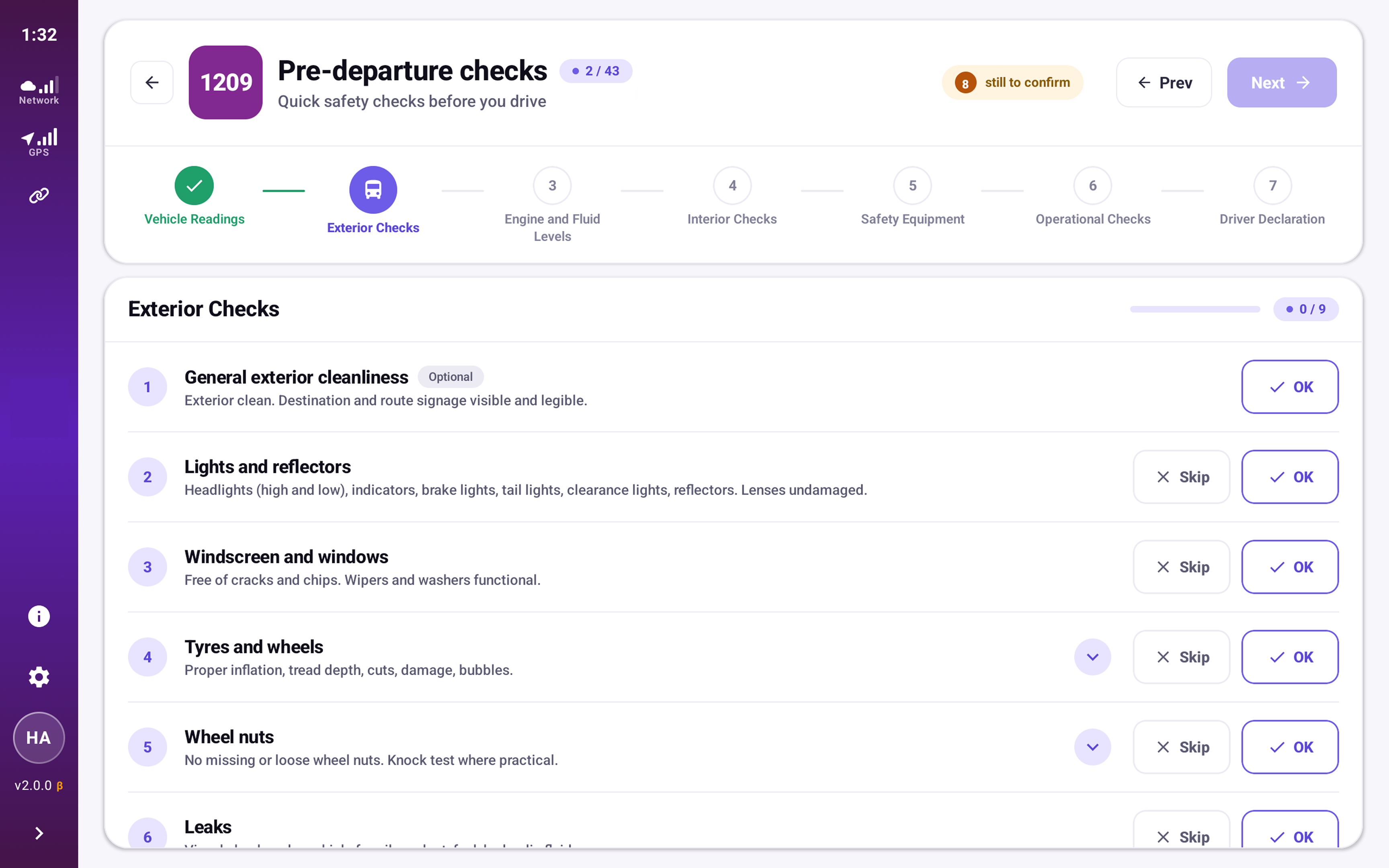
The pre-departure check is completed on the same tablet and recorded before the first trip.
When the driver starts the trip, Driverable gives turn-by-turn directions along the planned replacement route, with lane guidance, the next stop and on-time status on screen.
If the driver leaves the route, Driverable calculates a way back for a heavy vehicle, using routing from our technology partner HERE Technologies.
If there is no route the vehicle can legally take, the tablet tells the driver to park safely and contact operations.
3. Track and report: every bus, from the depot
The same trips that drivers run are tracked on the day and reported against the KPIs afterwards, so the operator and the agency work from one record of how the closure ran.
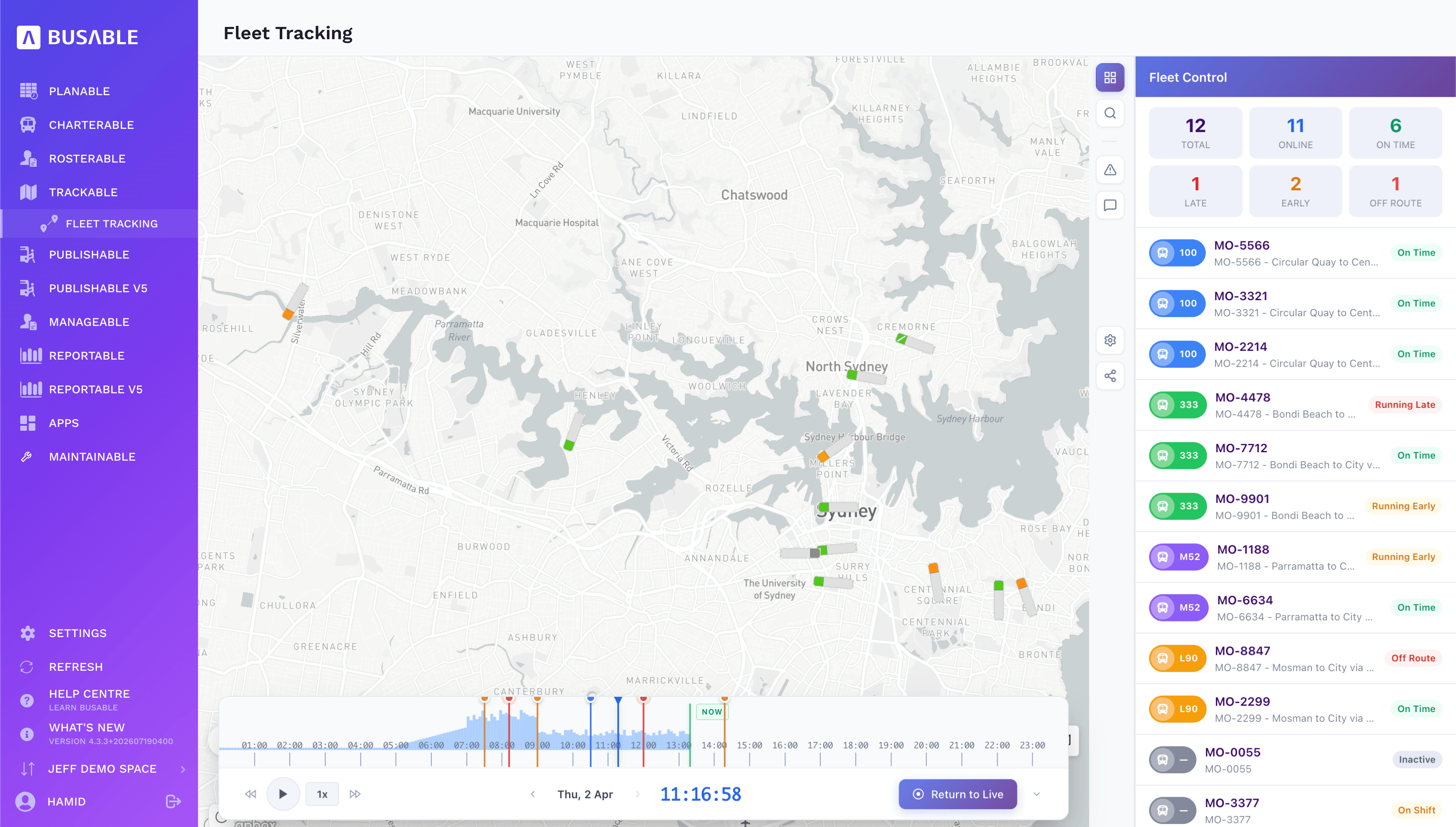
During the closure, each replacement bus or coach is shown on the live map against its scheduled trip: on time, early, late or off route, with its driver, next stop and estimated arrival. Any trip can be replayed later.
On-time running is measured from the tracked trips at the first, middle and last stops, for the period and day by day, against the target.
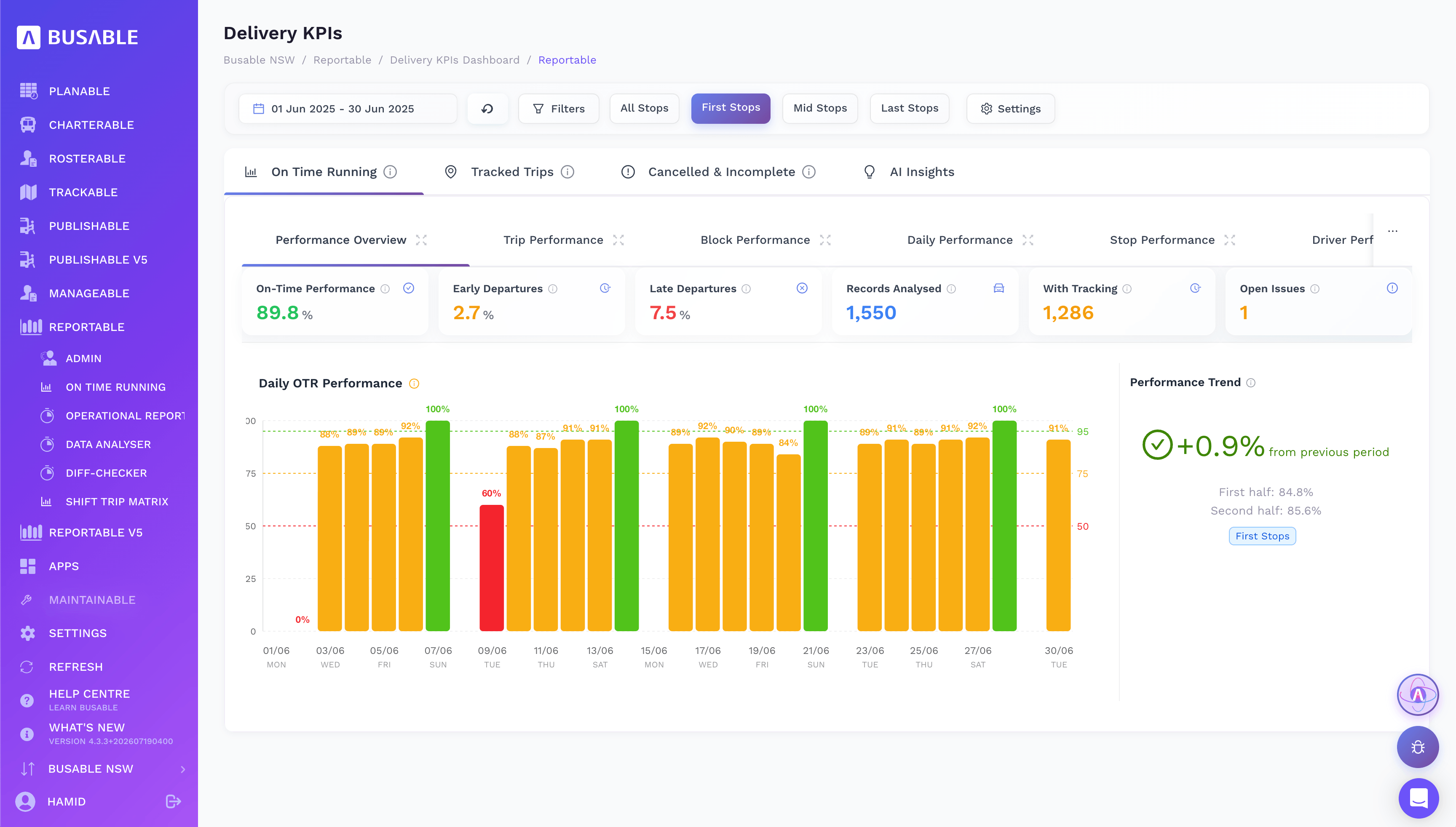
It breaks down by route, block, day, stop and driver, so a late-running trip can be traced to where the time was lost, and each issue can be logged and resolved.
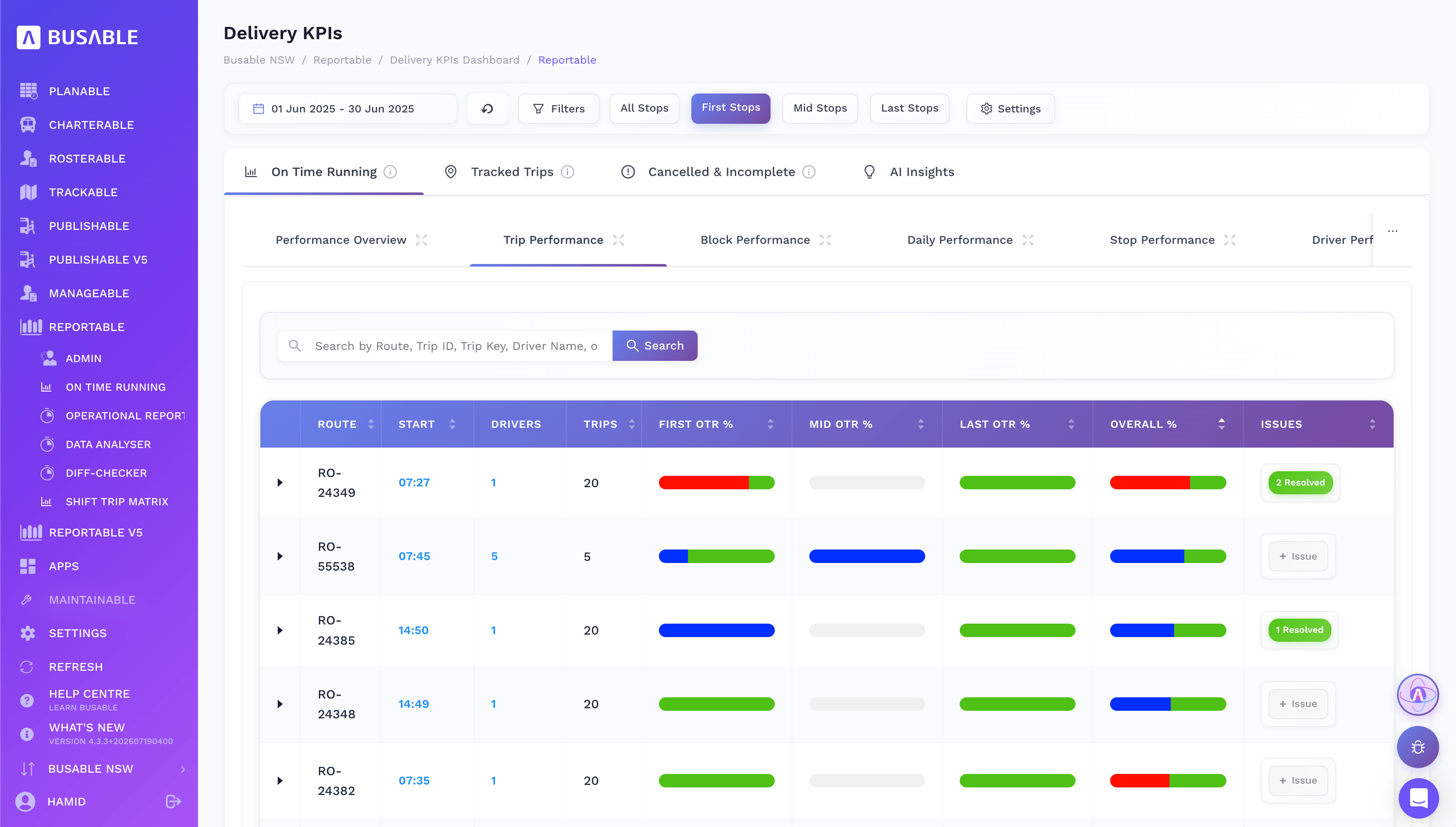
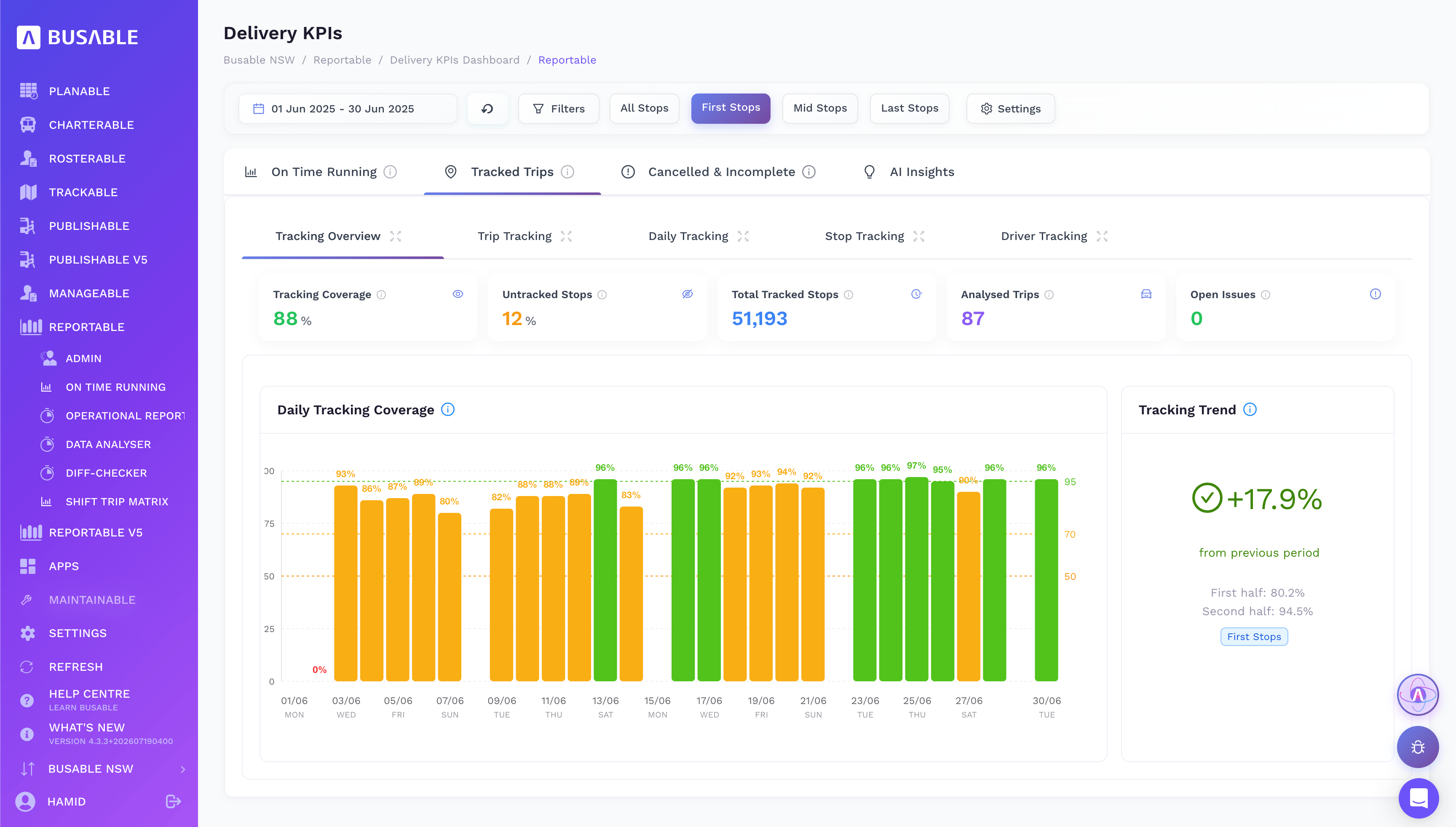
Tracking coverage shows how many stops reported a position and how many did not, so gaps in the data are visible rather than hidden in the averages.
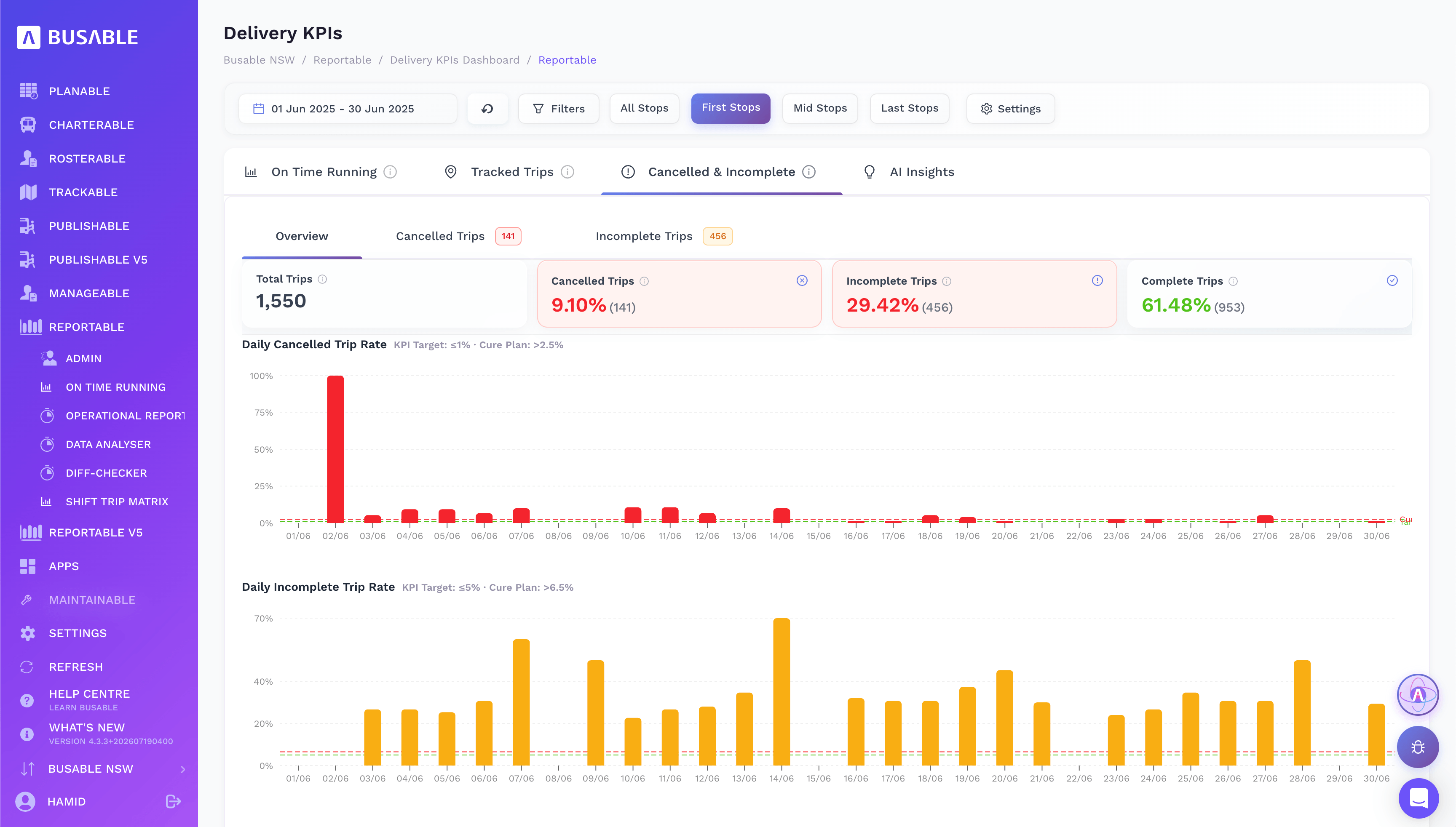
Cancelled and incomplete trips are reported as a share of all trips, against their KPI targets, with a list of every trip that did not run in full.
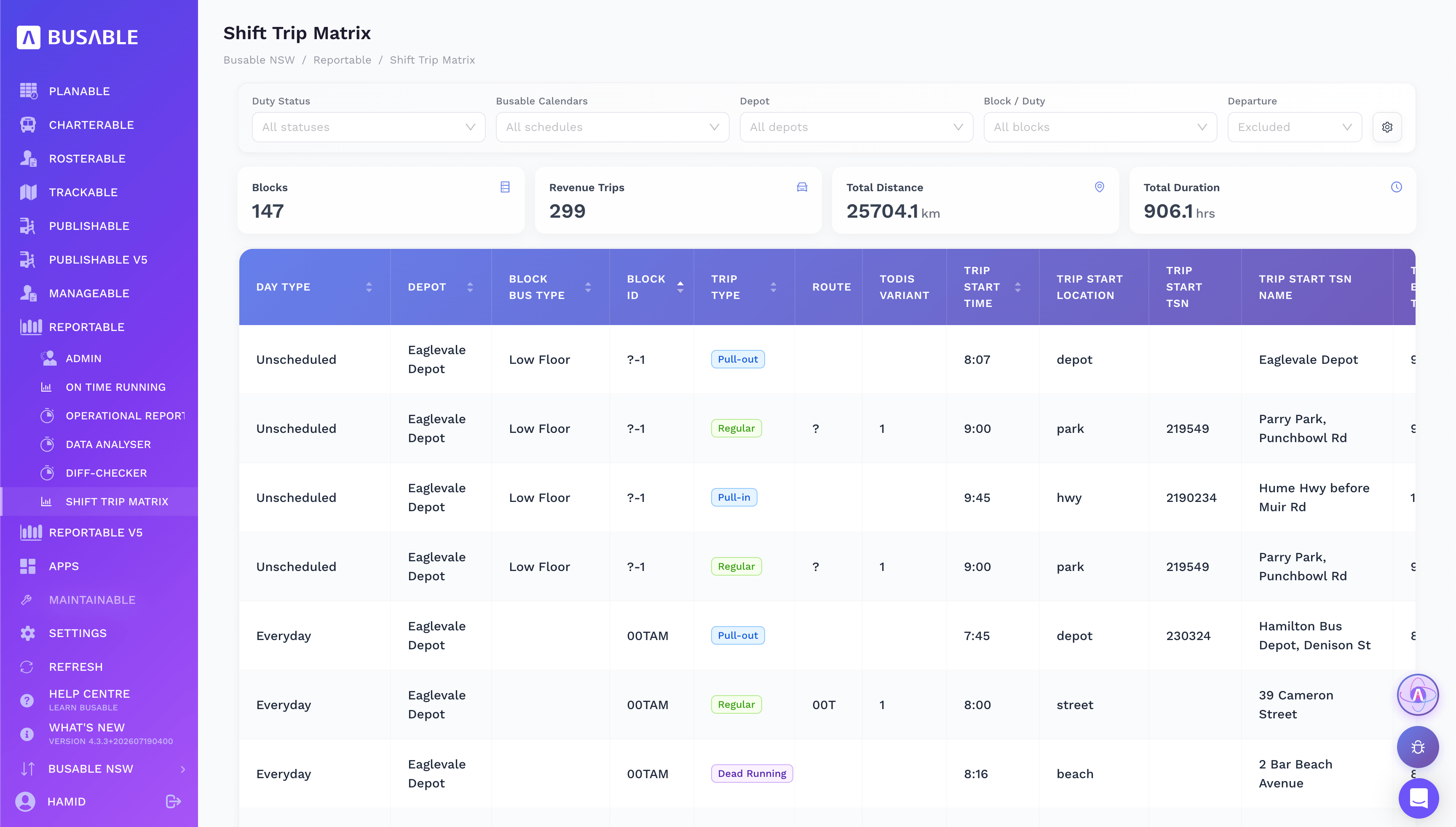
The Shift Trip Matrix lists every shift trip by trip, with kilometres and hours, and separates dead running from revenue trips. It is built from the same duties, so the figures the closure is costed and claimed on are not entered twice.
Your call at every step
Able AI drafts, and you decide. Nothing is created until you confirm it. Every duty stays a draft until you’ve checked it against your fatigue and licensing obligations. In NSW, every TODIS file goes to Transport for NSW under your name, authorised by you. Under heavy vehicle law those decisions stay with the operator, and Busable puts each one in front of you with the data entry already done.
For the transport agency
For Transport for NSW, TMR, Metro Trains and V/Line, a closure is only as good as the replacement buses that turn up. An operator running the closure in Busable works from the agency’s own timetable, has drivers following the corridor turn by turn, and can show afterwards how every bus ran: tracked trip by trip, with on-time running and a trip-level record of kilometres and hours.
Integrated modules for rail replacement
The parts of Busable a closure runs through, from the request to the report.
Able AI – The build
Planable™ – Routes and timetables
Rosterable™ – Duties and allocation
Driverable™ – The driver in the bus
Reportable™ – On-time running and costing
Rail replacement, common questions
What is rail replacement?
Rail replacement is the bus or coach service that carries passengers along a rail corridor while the track is closed for planned works or after an incident. The rail authority arranges the work and engages bus and coach operators to run it.
What is the difference between a possession, a track closure and an occupation?
They are the same thing in three states: a section of track taken out of service for engineering or project work. New South Wales calls it a possession, Queensland a track closure, with the replacement buses called railbuses, and Victoria an occupation.
How does rail replacement work in NSW, Queensland and Victoria?
In New South Wales, Transport for NSW issues bussing requests to operators on the Contingent Bussing Contract panel, and operators submit a TODIS file for each possession. In Queensland, TMR arranges replacement capacity for Queensland Rail track closures, and operators receive a PDF shift file for the railbuses. In Victoria, Metro Trains Melbourne engages replacement buses on the metropolitan network and V/Line engages Rail Replacement Coaches across regional Victoria through a statewide panel.
What is a TODIS file?
TODIS stands for Transport Operations Data Interchange Specification. It is the file a bus operator submits to Transport for NSW describing a temporary service: the route path, stops, timetable, calendar and the shifts that deliver it. CBC operators using Busable submit a validated file within 24 hours of the request.
What is a railbus shift file?
The PDF of driver shifts for a Queensland track closure: sign-on times, the trips each shift runs, standby shifts, effective dates and the dead runs out of and back into the depot. Able AI reads it and drafts the duties for the operator to confirm.
Can Busable build driver duties from a shift file or a published timetable?
Yes. Able AI reads the shift file, possession timetable or replacement plan, matches every trip, and drafts the duties and dead runs. It shows what it found before creating anything, saves everything as a draft and runs a fatigue check across every duty.
How do drivers find their way on a replacement route?
Through Driverable on the tablet in the cab. It has their duty in order and turn-by-turn directions along the replacement route, planned for a heavy vehicle, and shows whether they are on time at every stop.
What KPIs can Busable report for rail replacement work?
On-time running at the first, middle and last stops, broken down by route, block, day, stop and driver; tracking coverage; cancelled and incomplete trips against KPI targets; and the Shift Trip Matrix with kilometres and hours for every shift. All of it comes from the tracked trips.
Can the agency see how the replacement buses ran?
Yes. Each replacement bus is tracked against its trip, on-time running is reported by route, day, stop and driver, and the Shift Trip Matrix gives a trip-level record of kilometres and hours for every shift.
Got a closure coming up?
Bring us your next bussing request, shift file or replacement plan, and we’ll walk you through it.
Or read the NSW guide to the CBC and TODIS files and how QLD railbus shift files become driver navigation.