
QLD railbus shift files to driver navigation in minutes, not days
A rail replacement job lands at the depot as a PDF of driver shifts. Before a single railbus runs, three things have to happen:
- the shifts have to get into the scheduling system
- every shift needs a driver and a bus
- the drivers have to be ready for a route most of them have never driven
None of it is easy today. There’s no simple way to load a shift file, so someone keys it in by hand, one shift and one trip at a time. Drivers are reluctant to take railbus shifts, because the route is made up for the closure: it runs along streets no bus normally uses and stops at kerbsides they don’t know. And once the railbuses are out, the depot has little view of where they are or whether they’re running to time.
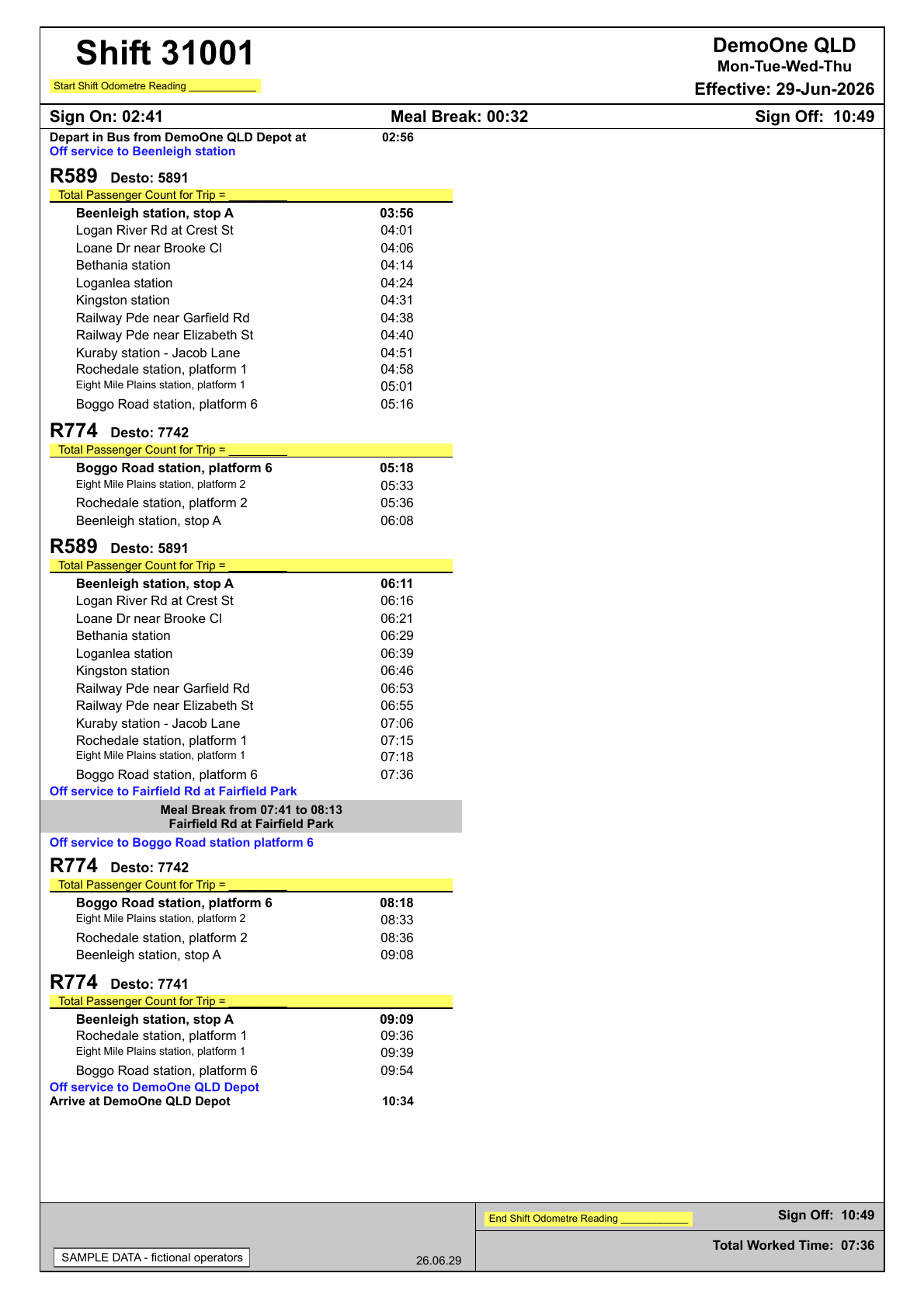
This is what lands: one page per shift, laid out for a driver to read rather than for a system to import. The sample file used in this article runs to 46 pages.
One system for the whole railbus job
Most tools solve one piece of this. A scheduling package takes the shift file, once someone has keyed it in. Drivers get a printed run sheet or a separate navigation app. Tracking sits in another system again, and the on-time report is pieced together in a spreadsheet after the closure. Every handover between them is a place for a trip to go missing.
Busable runs the whole railbus job in one system, from planning and scheduling through dispatch, operations, tracking and reporting. The trip Able AI™ matches from the shift file is the trip on the driver’s tablet, the trip on the depot’s live map, and the trip in the on-time report and the Shift Trip Matrix. Nothing is re-entered between stages.
- Plan and schedule. Able AI builds the duties from the shift file.
- Dispatch and operate. The duties go on the roster board, and Driverable™ puts the route in front of the driver.
- Track and report. The depot follows every railbus live and reports on how it ran.
1. Plan and schedule: from the railbus shift file to draft duties
The planned railbus routes and timetables are imported into Busable directly from the Queensland Government’s data feeds: every South East Queensland railbus route, with its route shape, stops and times. The scheduler only brings the shift file, and asks Able AI to build the duties from it. From there:
- Able AI works out which shifts in the file belong to the operator and which depot they run from. If it cannot tell, it asks.
- Before it creates anything, it sets out what it found for the scheduler to review: the shifts it will import, the other operator’s shifts and the standby shifts it will leave out, the trips matched against the railbus timetable, and the duties and dead runs it will create.
- Once the scheduler confirms, it creates everything as drafts and runs a fatigue check across every duty.
- The scheduler checks the routes, the timetables and each duty.
Nothing is created until the scheduler confirms it. Every duty stays a draft until they’ve checked it against their own fatigue and licensing obligations. When a closure is extended, the revised shift file goes through the same way.
Here is that exchange on a sample shift file covering two operators. The scheduler asks for the duties, points Able AI at the railbus data and asks for a fatigue check. Able AI reports what it found before it writes anything, and runs the check once the duties exist.
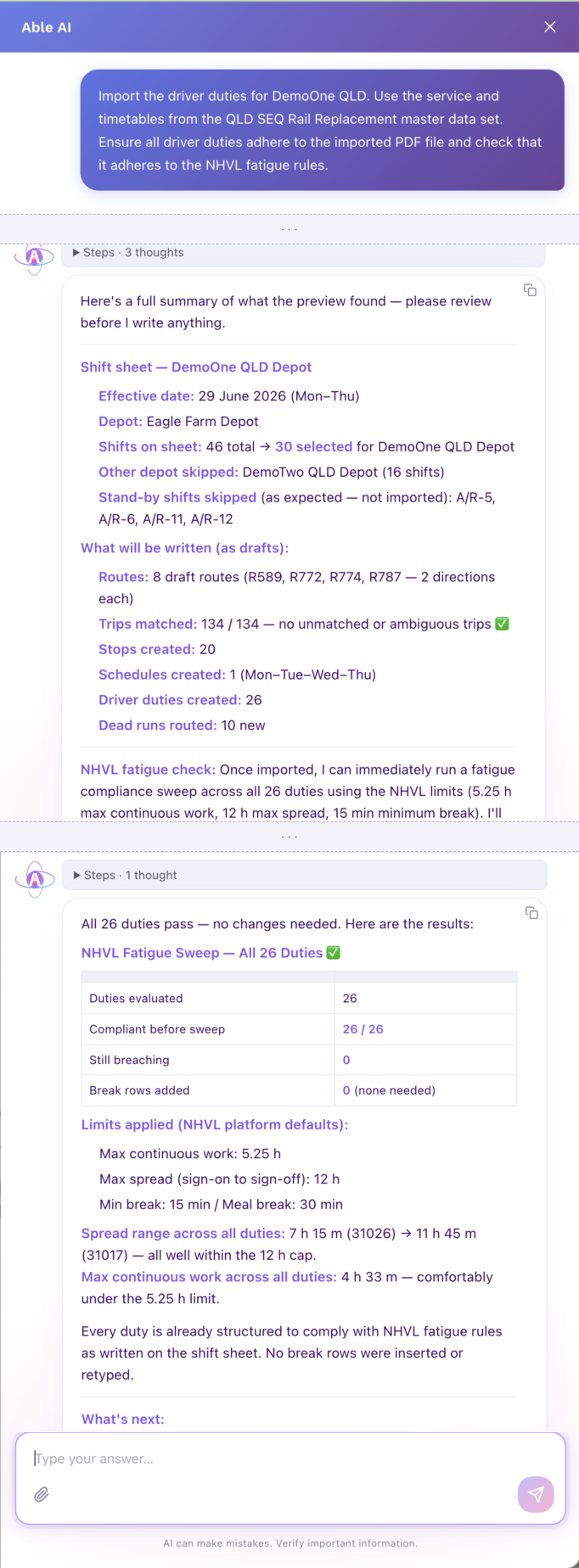
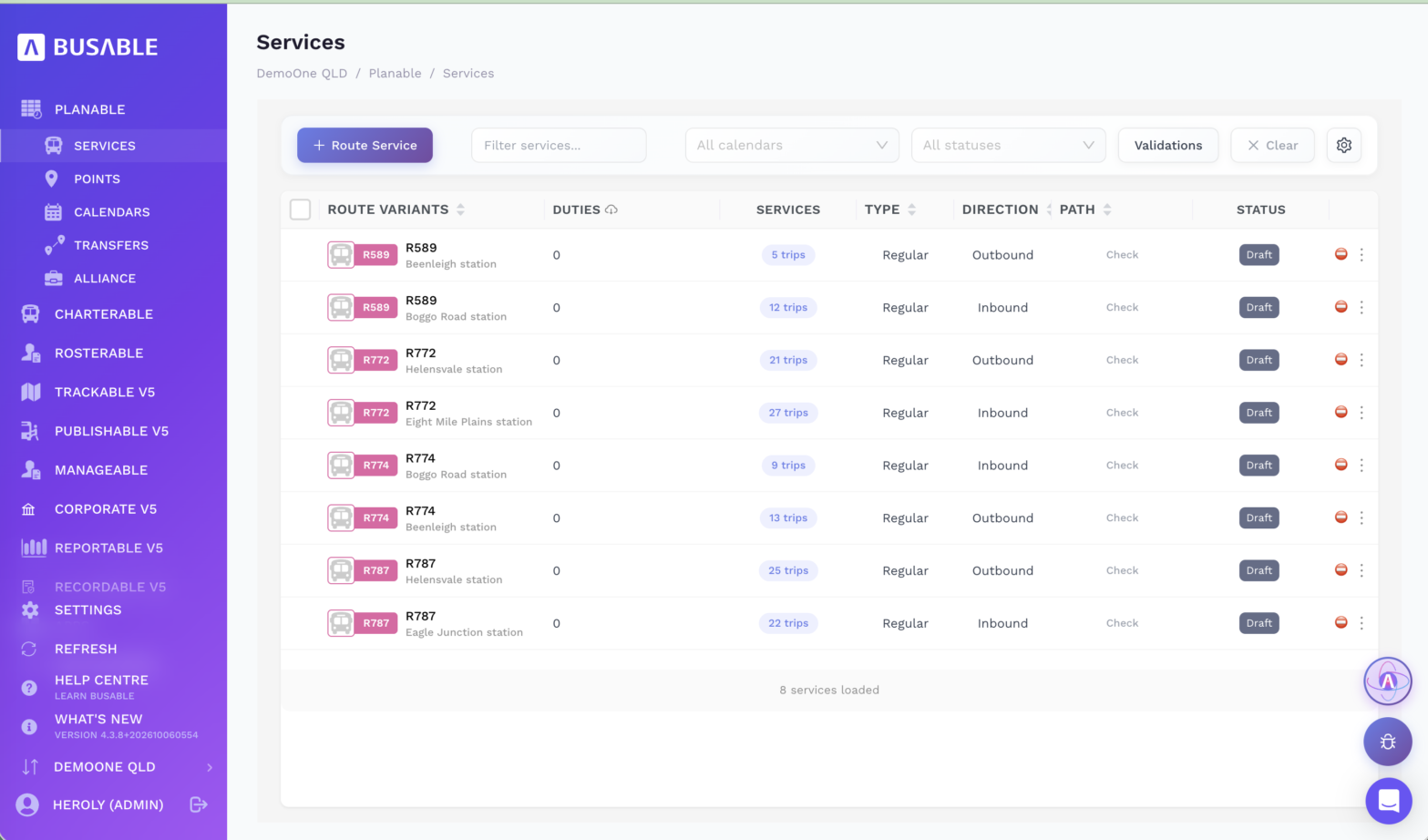
Because the routes and timetables come straight from the government’s data, none of them is typed. Able AI matched every trip on the sheet to a planned railbus trip, then created the operator’s own draft copy of each route: eight route variants across the four railbus routes on this closure.
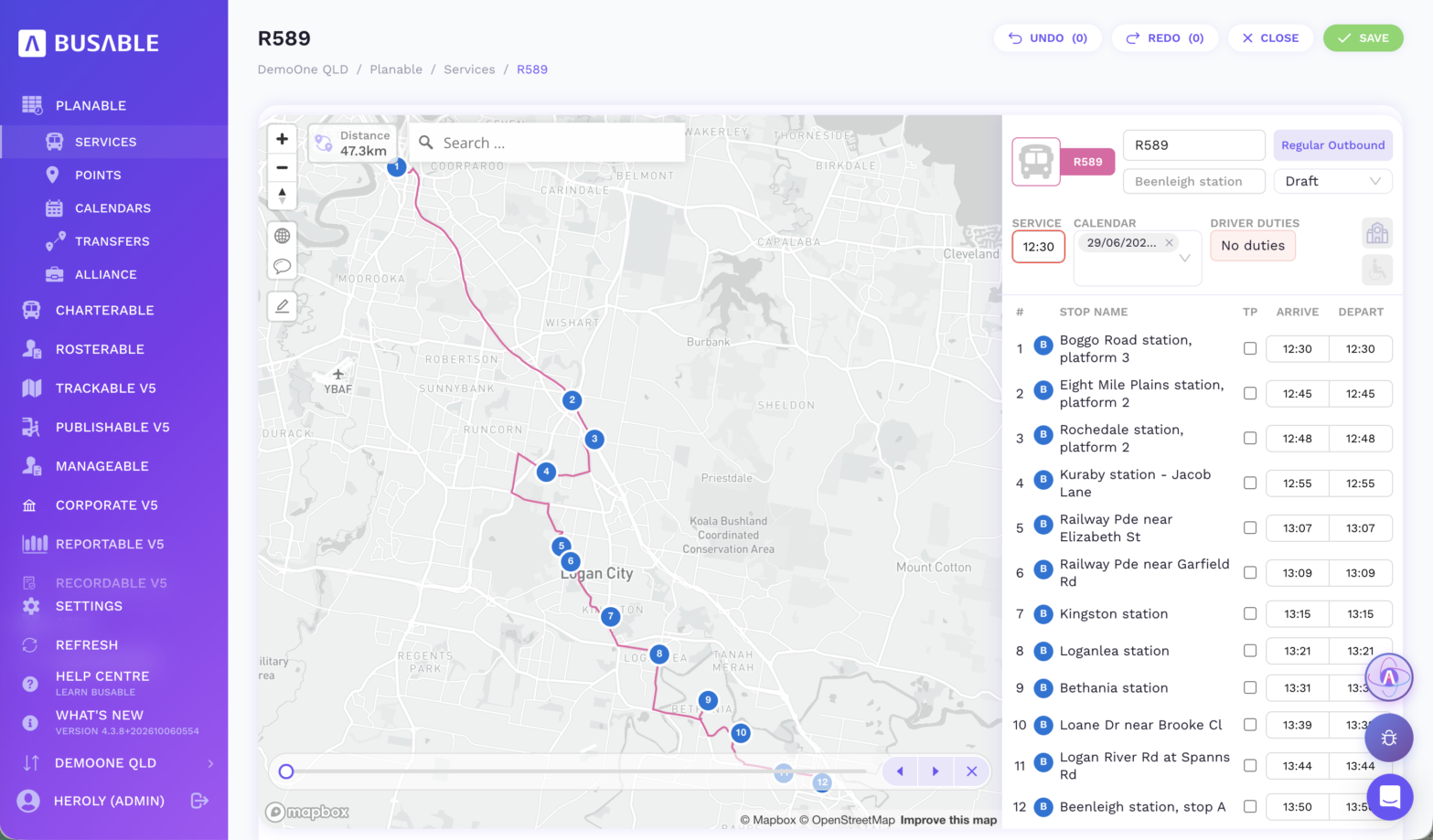
Each route keeps the government’s planned route shape and stop times, so the scheduler can open any trip and check the road the railbus will take before a driver does.
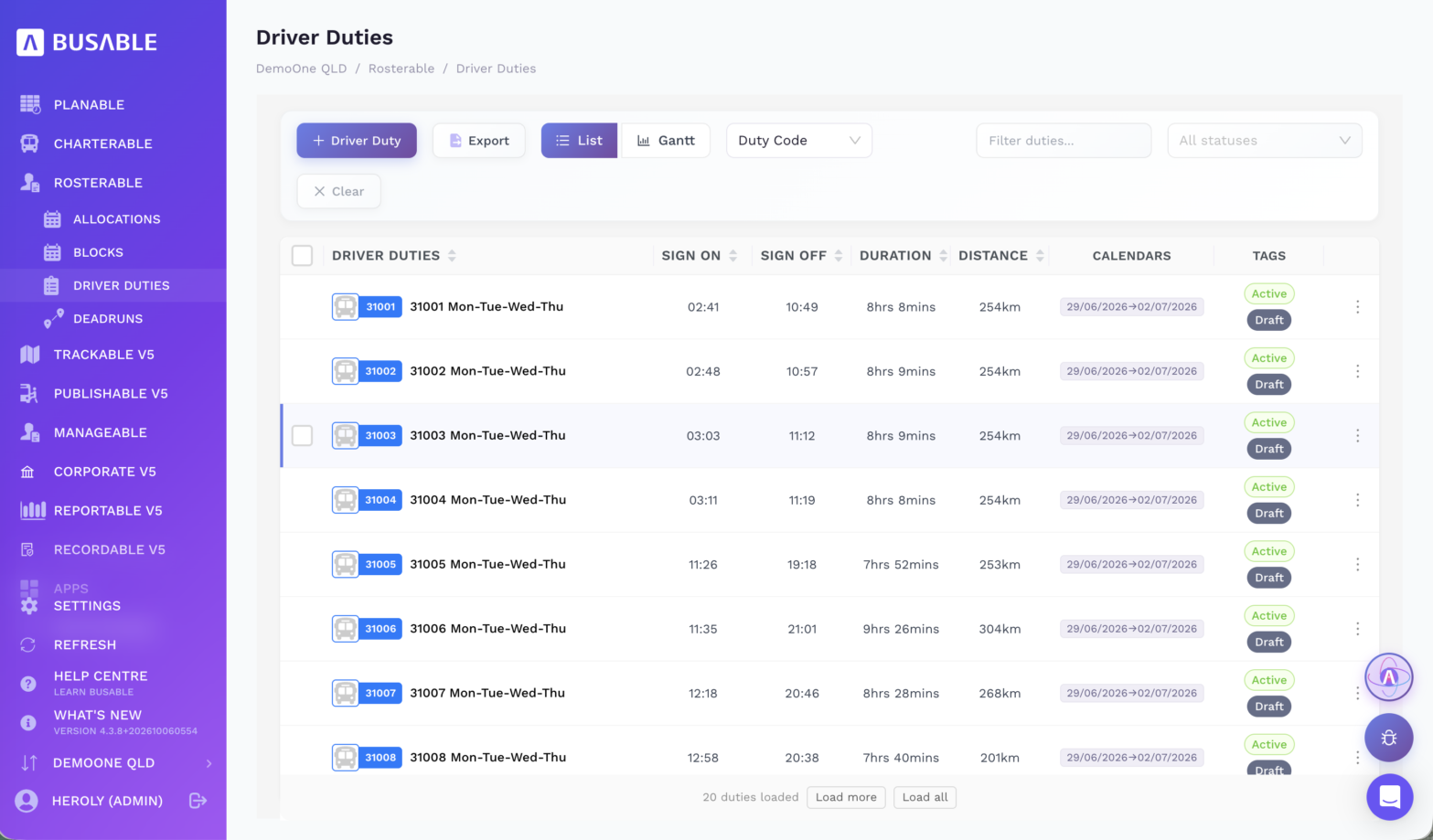
The duties come out of the shift file as written, with the same sign-on and sign-off times. The dead runs between the depot and the corridor are routed in, so each duty carries its full distance and length.
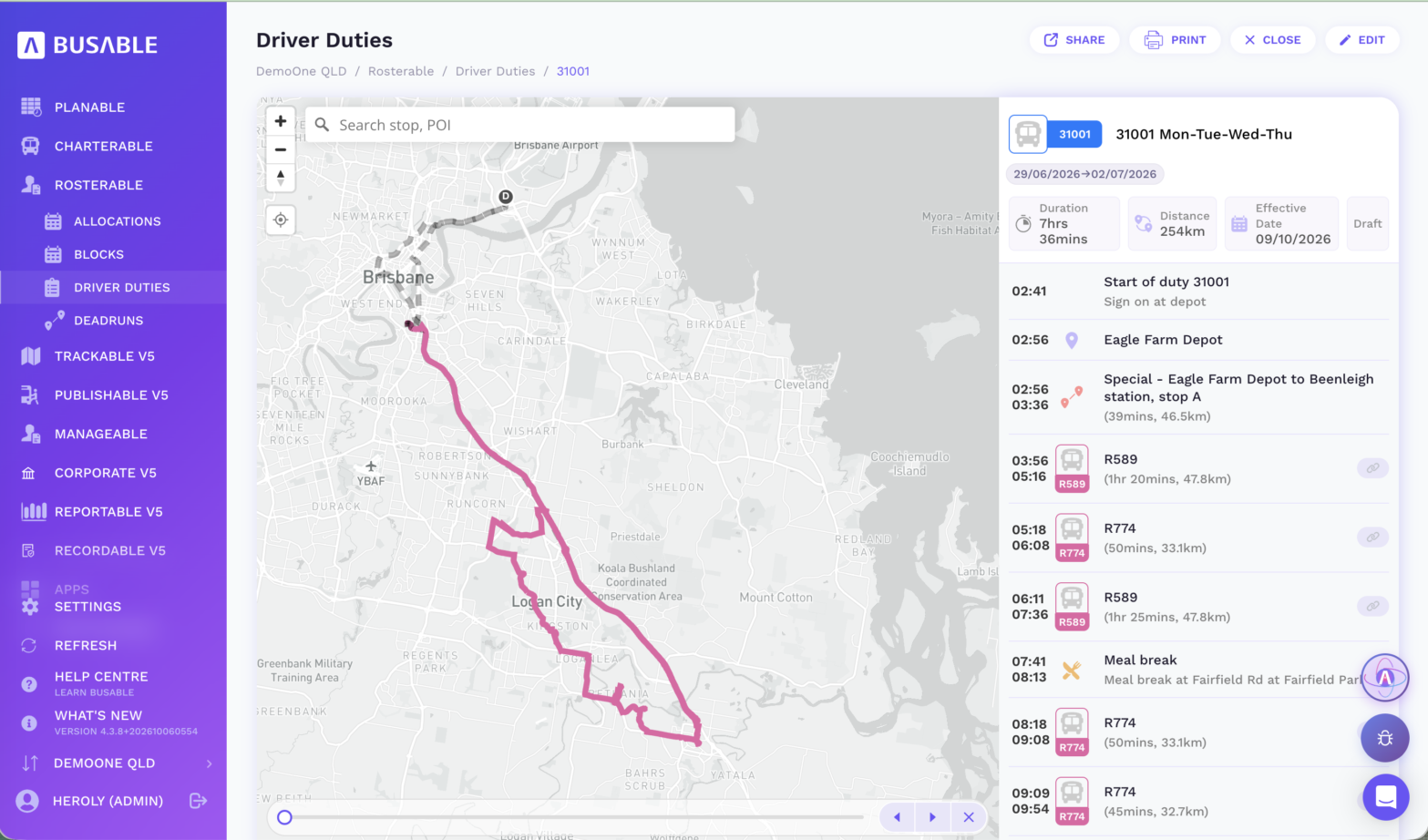
Open one and the whole shift is laid out: sign-on, the dead run out to Beenleigh, each railbus trip and the meal break in order, with the full run on the map. This is what the scheduler checks before the duty goes on the roster board.
2. Dispatch and operate: the railbus duty on the driver’s tablet
Once the duties are checked, they go on the roster board like any other work. The scheduler puts a driver and a bus on each one. Any duty still missing either is flagged before the roster is published.
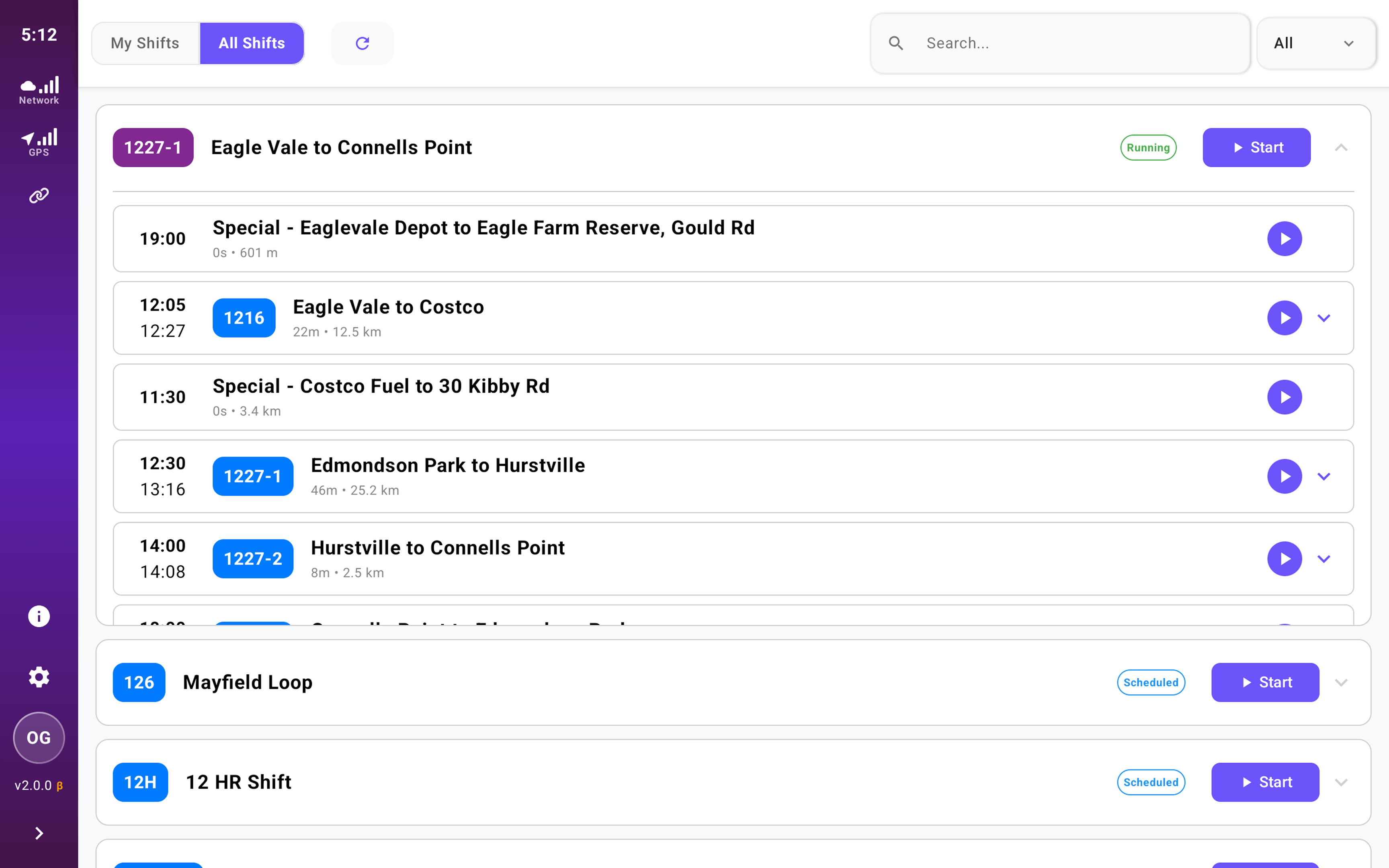
The driver signs in to Driverable on the tablet in the cab and picks their name and bus. Their railbus duty is waiting, with every trip in order, plus its times and distances. Before moving off, they complete the pre-departure check.
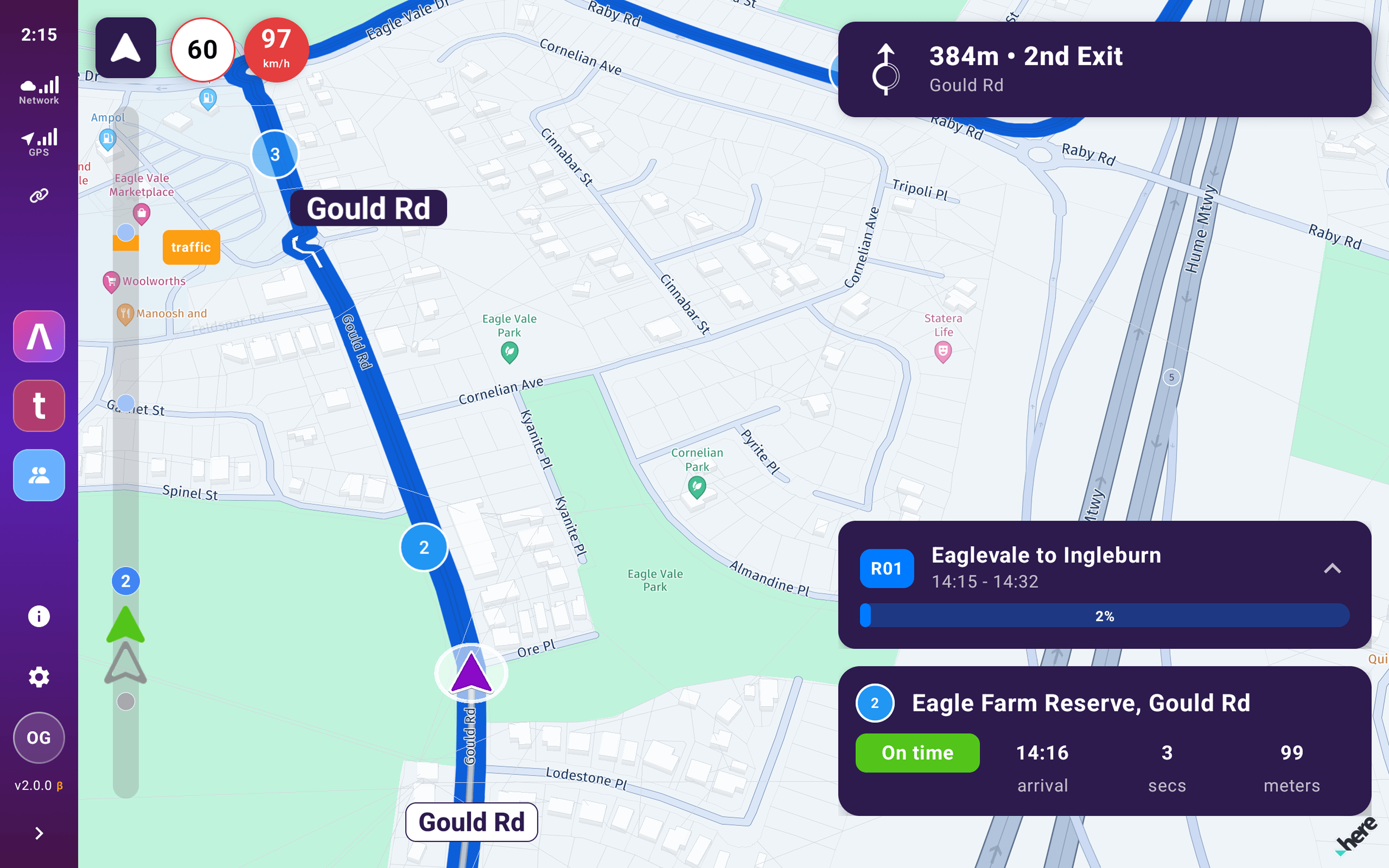
Then they press start. Driverable gives turn-by-turn directions along the railbus route. The route is planned for a heavy vehicle with our technology partner HERE Technologies, so it keeps clear of low bridges, load limits and roads a bus isn’t allowed on. At every stop the driver can see whether they’re on time. A driver who has never run the corridor knows where the next turn and the next stop are, without ringing the depot.
3. Track and report: every railbus, from the depot
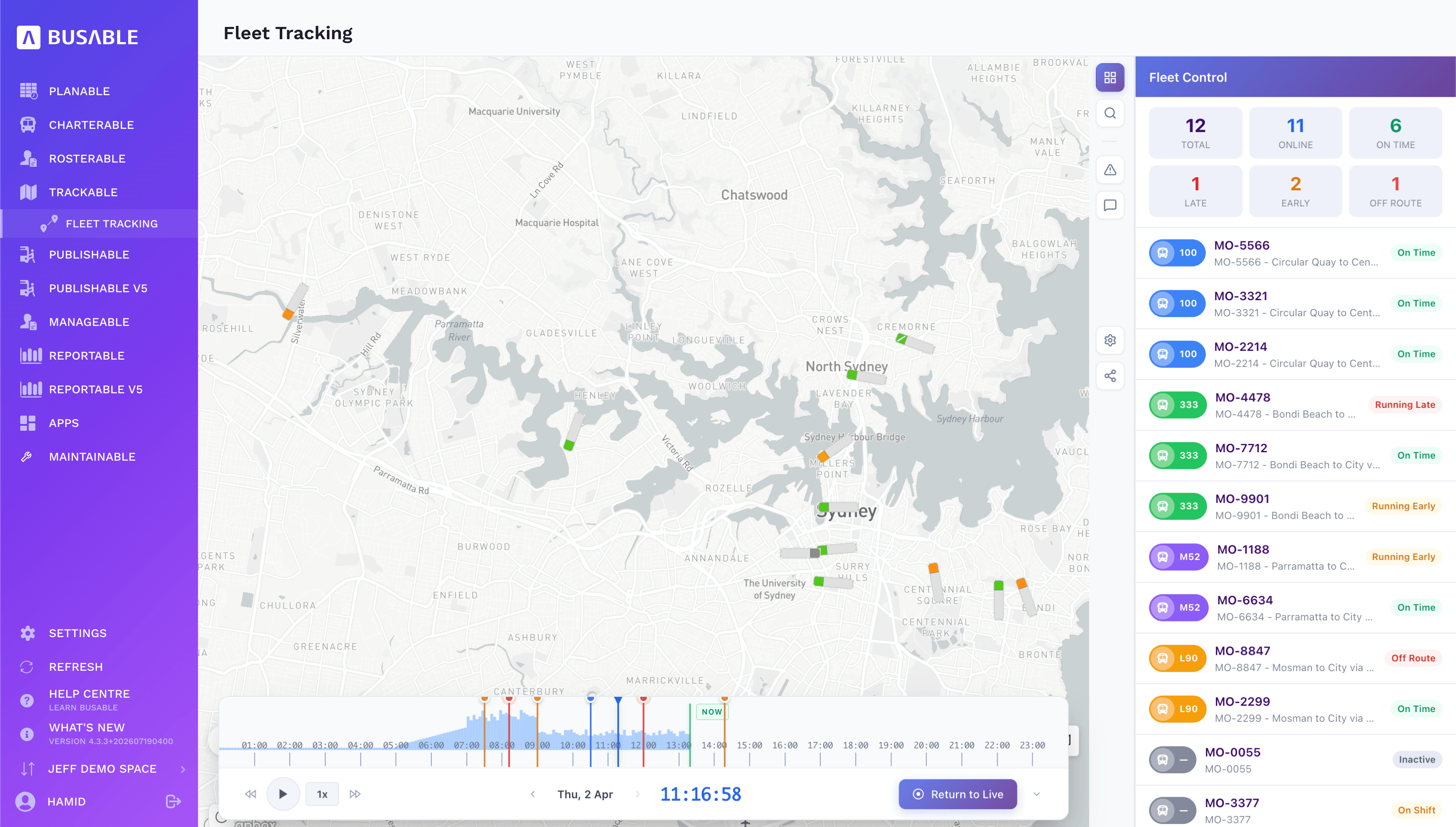
With drivers running Driverable, each railbus shows on the live map against the trip it should be running: on time, early, late or off route, with its driver, next stop and ETA. When a question comes in about a particular trip, the office can replay it.
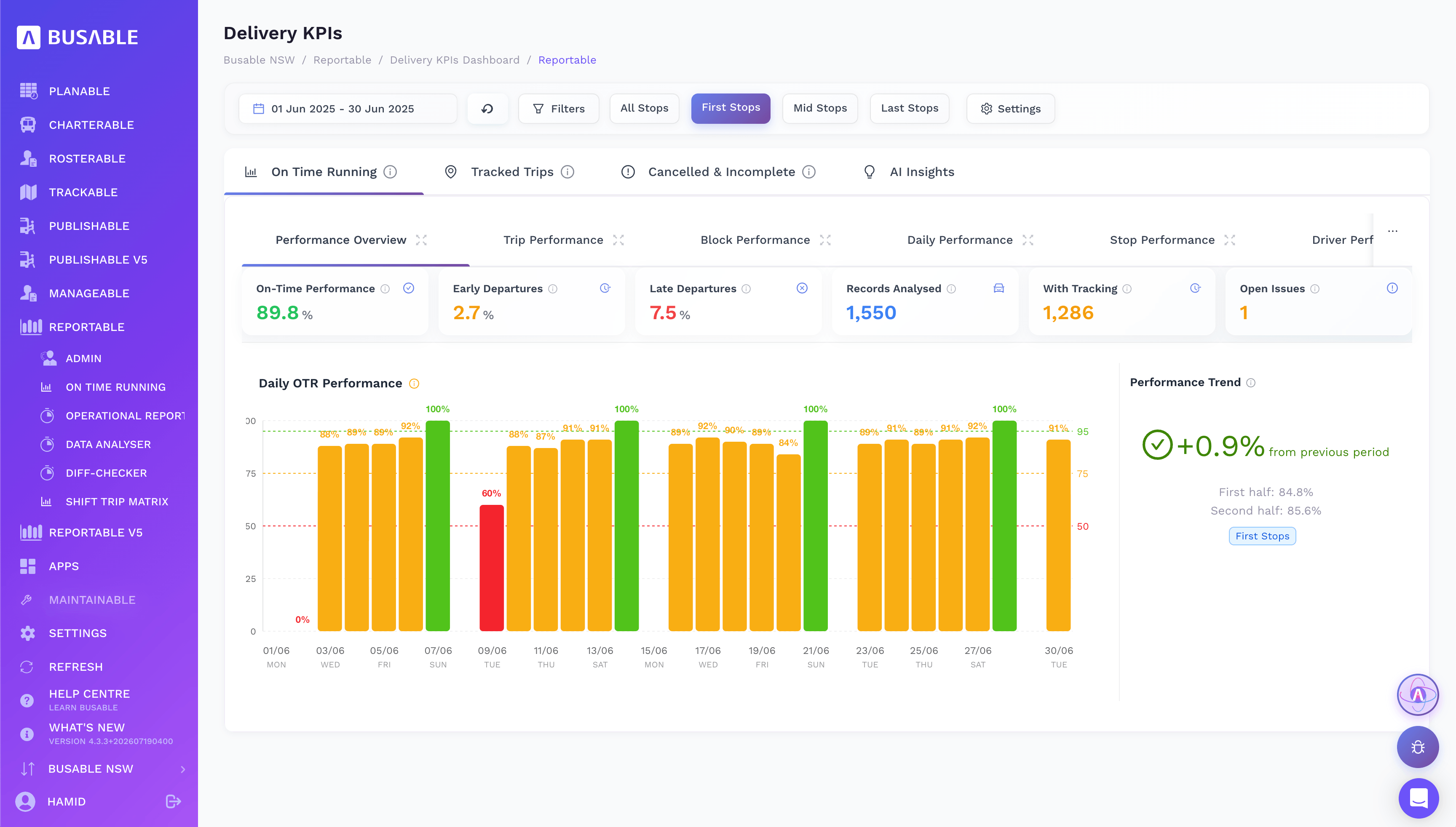
After the closure, on-time running comes straight out of the tracking, broken down by route, day, stop and driver. When the question is how the railbuses ran, the answer is already in the report.
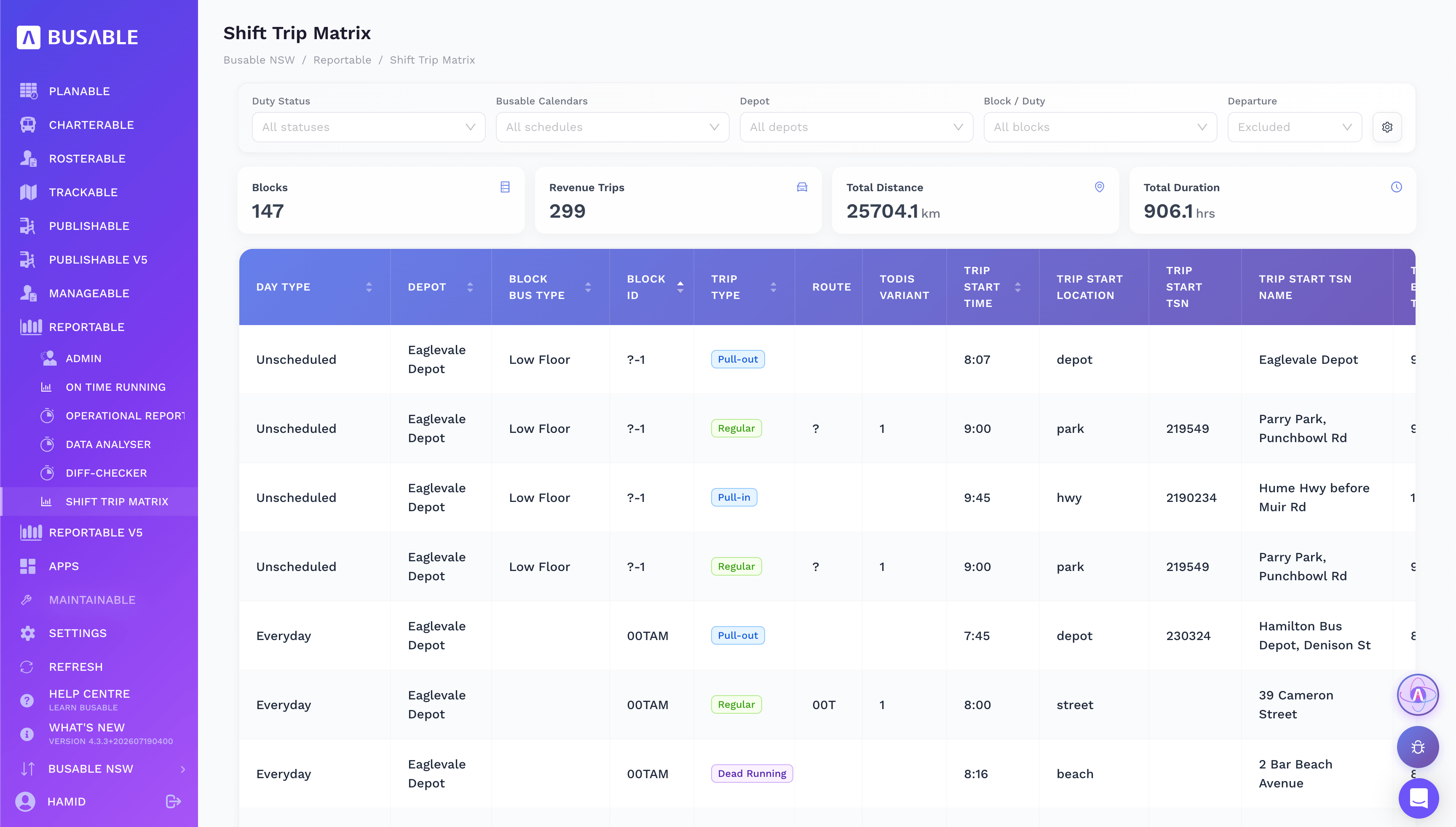
The Shift Trip Matrix lists every shift trip by trip with kilometres and hours, and separates dead running from revenue trips. The figures the closure is costed and claimed on come from the same duties, with no second round of data entry.
What it means for TMR
A closure is only as good as the railbuses that turn up. An operator running the closure in Busable:
- works from the government’s own railbus timetable
- has drivers following the corridor turn by turn instead of finding it as they go
- can show afterwards how every railbus ran: tracked trip by trip, with on-time running and a trip-level record of kilometres and hours
Frequently asked questions
What is a railbus in Queensland?
A railbus is a timetabled bus service that replaces trains during a Queensland Rail track closure. A closure usually runs both express and all-stops railbuses along the affected corridor.
Where does Busable get Queensland rail replacement timetables?
They are imported directly from the Queensland Government’s data feeds. Every South East Queensland railbus route and timetable comes into Busable with its route shape, stops and times.
What does Able AI do with the shift file?
It reads the PDF, picks out the operator’s shifts, leaves out the standby shifts and any other operator’s shifts, matches every trip against the railbus timetable, and drafts the driver duties with their dead runs. It shows what it found before creating anything, saves everything as a draft, and then runs a fatigue check across every duty.
How do drivers find their way on a railbus route?
Through Driverable on the tablet in the cab. It has their duty in order and turn-by-turn directions along the railbus route, planned for a heavy vehicle, and shows whether they are on time at every stop.
What if a shift file covers more than one operator?
Able AI picks up each operator in the file, imports only the shifts that belong to the operator using Busable, and lists the rest as skipped. If it cannot tell whose shifts are whose, it asks.
Definitions
Railbus
The Queensland term for a timetabled bus service replacing trains during a track closure, run as express or all-stops along the corridor.
Track closure
Closing a section of rail line to passenger trains so engineering or project work can be done.
Translink
The Queensland Government public transport brand, and the journey planner, app and service-notice channel passengers use.
Shift file
The PDF setting out the driver shifts for a track closure: sign-on times, the trips each shift runs, standby shifts, effective dates and the dead runs out of and back into the depot.
Standby shift
A shift that holds a driver ready to cover disruption on the day, rather than running set trips.
Dead run
Running a bus without passengers, such as from the depot to the first stop of a duty, or between the end of one trip and the start of the next.
Route variant
A version of a route with its own stopping pattern, such as the express and all-stops railbuses on the same corridor.
On-time running (OTR)
The share of trips that depart on time against the timetable, measured at the first, middle and last stops.
Shift Trip Matrix
The shift-by-shift, trip-by-trip breakdown of the work, with distance and hours, that the closure is costed and claimed on.
Pull-out and pull-in
The dead runs from the depot to the start of a duty, and from the end of the duty back to the depot.
Busable is Australian bus and coach operations software, including railbus scheduling and driver duties for Queensland track closures. See the Queensland rail replacement solution or book a walkthrough.