
TfNSW rail replacement and the Contingent Bussing Contract: how a TODIS file keeps passengers informed
Every weekend, somewhere on the NSW network, a section of track closes for planned maintenance. Trains stop. Buses take over. In industry language that closure is a possession, and the buses are rail replacement services.
For a passenger standing on a platform on a Saturday morning, the question is simple: where is my bus, and when does it get here. Whether they can answer that from their phone comes down to one thing — whether the operator running those buses has a current TODIS file in Transport for NSW systems.
What is TfNSW rail replacement?
TfNSW rail replacement is the substitution of buses for trains on a rail corridor that has been closed. Most of it is planned. Sydney Trains takes possession of a section of track for engineering works — replacing sleepers, signalling upgrades, station works — and Transport for NSW arranges buses to move passengers along the corridor while the track is out of service.
Possessions run to a forward schedule and come in several sizes: overnight closures after the last train, standard weekend closures from Friday night to Monday first train, longer multi-day closures over Easter, Christmas and school holidays, and major closures lasting weeks for strategic projects.
What is the Contingent Bussing Contract (CBC)?
The Contingent Bussing Contract, or CBC, is the TfNSW panel arrangement under which bus and coach operators are engaged to deliver rail replacement work. Transport for NSW issues a bussing request to operators on the panel setting out the corridor, the timetable and the shifts required. Operators respond with what they can cover, and deliver the work under the CBC terms and conditions.
CBC panel operators are typically charter and coach businesses rather than metropolitan contract holders. Work is often reallocated at short notice: an operator who has taken a job may hand shifts back, and those shifts are then offered to another operator on the panel, sometimes only days before the possession.
What is a TODIS file?
TODIS stands for Transport Operations Data Interchange Specification. It is the standard format a bus operator uses to hand service data to Transport for NSW.
A TODIS file describes a temporary service the way a computer needs it described:
- the route path the bus physically drives, turn by turn
- every stop it serves, in order
- the timetable for each trip
- the calendar, meaning which days the service runs
- the vehicle and driver shifts that deliver it
Once the file is accepted, the weekend service exists as real data inside TfNSW systems rather than as a PDF attached to an email. That is the difference between a service a passenger can look up and a service they have to guess at.
How does a CBC operator submit a TODIS file to TfNSW?
At a high level, five steps.
- The bussing request. TfNSW plans the closure and issues a request to operators on the CBC panel, setting out the corridor, the timetable and the shifts required.
- Coverage confirmed. The operator works out whether it can cover the work and confirms back to Transport for NSW. The turnaround expected is usually the next morning.
- The service is built. Route path, stops, timetable and calendar, then the vehicle blocks and driver shifts.
- Validation and submission. The data is checked, then submitted to TfNSW as a TODIS file. The validator either accepts it or returns errors to be fixed. There is a daily processing cut-off, so a file submitted after it is processed the following day.
- The data goes live. Once processed, the temporary service exists in TfNSW operational systems — reaching the driver navigation app TfNSW issues, and the real-time information passengers see.
Steps three and four are where the weekend is won or lost.
Operators authorise a third party to submit on their behalf by written authority to TfNSW, which also nominates the addresses that receive TODIS status notifications. New operators should expect the TfNSW side of that setup to take several weeks.
Where the route path ends up: the driver's screen
The route path is the part operators tend to treat as paperwork. It is actually the source data for navigation.
A rail replacement route does not exist in any public timetable. It is invented for one weekend, along streets no bus normally runs, calling at kerbside stops that are not normally bus stops. No driver knows it by heart, and plenty are working that corridor for the first time.
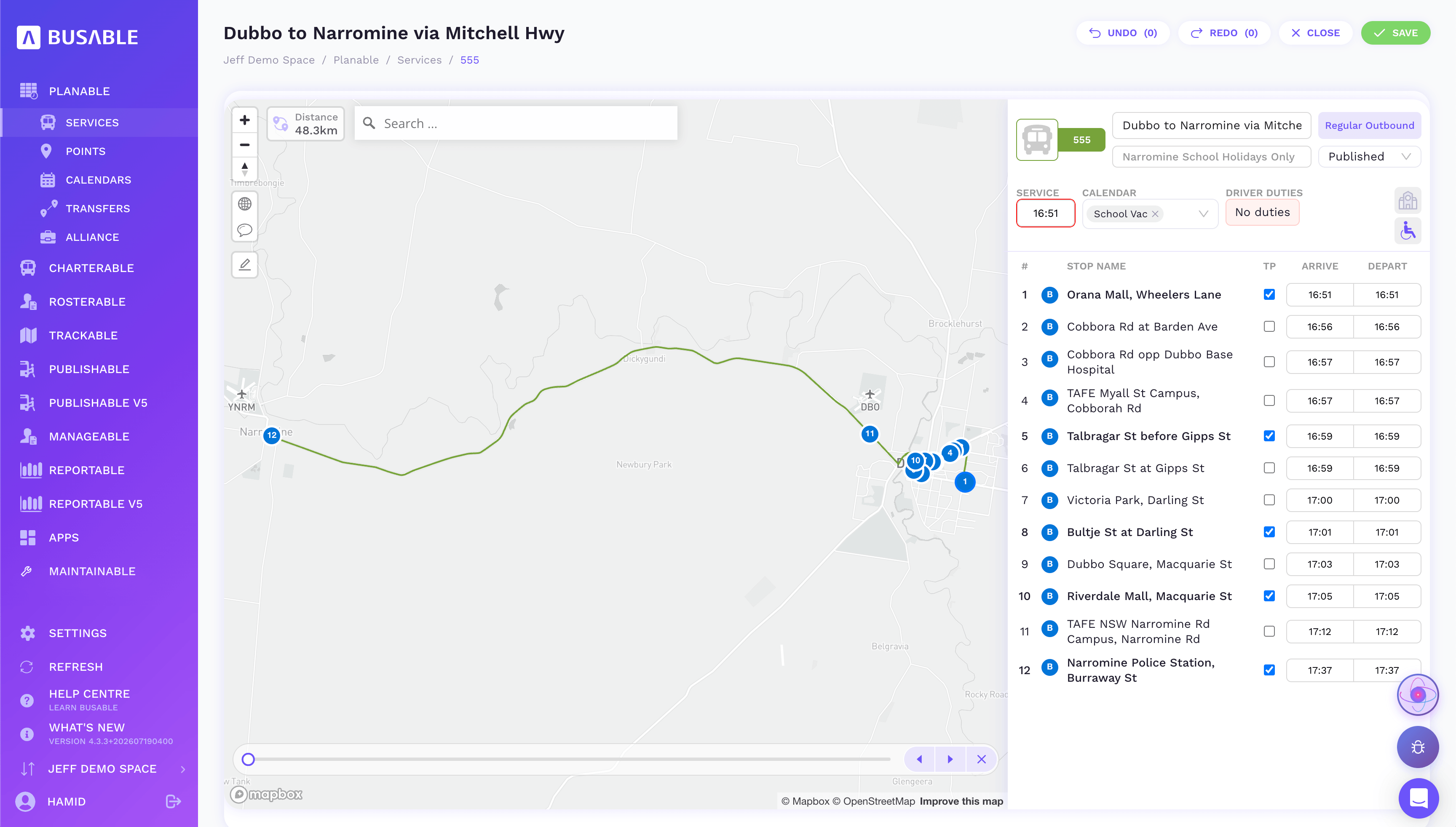
In Busable the route path is built and verified on a map, turn by turn — every left and right, stop to stop. That mapped path is what goes into the route file inside the TODIS submission, alongside the timetable. TfNSW refers to it as the R file.
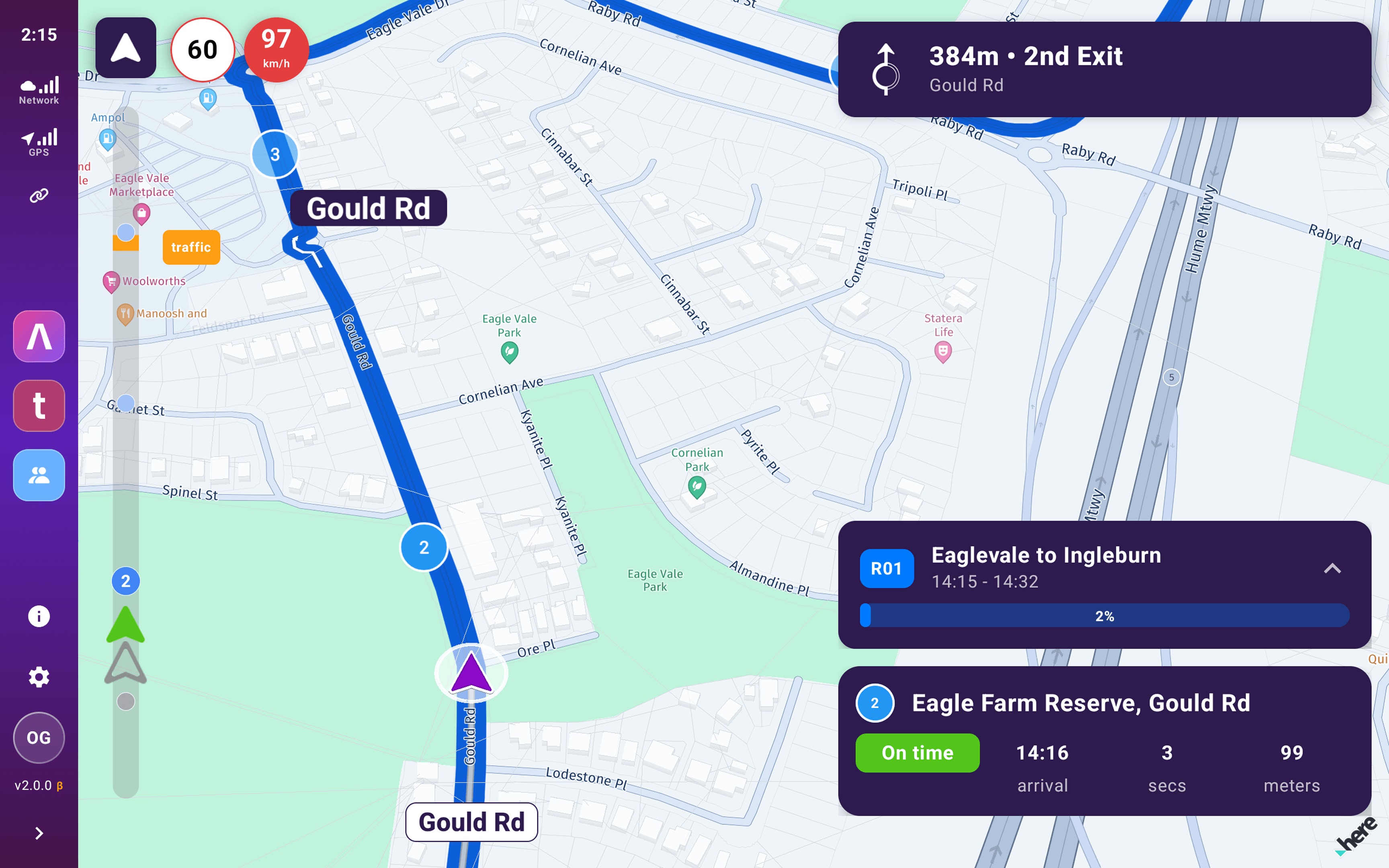
Once TfNSW has processed it, that is what reaches the driver. The navigation app on the tablet in the bus is TfNSW's own software, issued by the government — not ours. It works from the trips in the file rather than from a shift, so the driver opens it and sees the list of trips to run and the road to follow for each one.
Route path drawn and verified in Busable → the TODIS route file → processed by TfNSW → turn-by-turn guidance on the government's driver app.
It is a short chain, which is what makes both ends of it matter. Get the left and right turns wrong and the driver is confidently navigated down the wrong street with a full bus. Miss the submission and the app has nothing to show at all: an operator without an accepted TODIS file cannot use the TfNSW navigation app, and is back to paper run sheets or a third-party app.
The same trips are what real-time information is matched against. That is what lets a passenger open their phone and see where their replacement bus actually is, instead of guessing from a notice taped to a pole. The driver knowing the road and the passenger tracking the bus are the same dataset, submitted once.
Why does TODIS turnaround time matter?
Rail replacement work does not arrive with a comfortable lead time. Shifts get handed back by one operator and offered to another. Corridors get extended. A stop moves from one street to the next two days out because TfNSW needs the stopping pattern to match an adjoining route, and the whole file has to be rebuilt and resubmitted.
Done by hand, that is someone in a depot office drawing route paths and typing timetables, then waiting to find out whether the file passed validation. It routinely does not fit inside the window. When it does not, the buses still run. They just run invisibly. No journey planning, no live tracking, no in-cab navigation for the drivers. Passengers fall back on printed notices and marshals pointing down the street.
How does Busable produce a TODIS file within 24 hours?
CBC operators working in Busable produce and submit a validated TODIS file inside 24 hours of the request. Same day where the request lands before the daily processing cut-off, next morning where it does not. Late changes are re-cut and resubmitted the same way.
Four things make that possible.
An AI agent reads the possession requirements and does the build
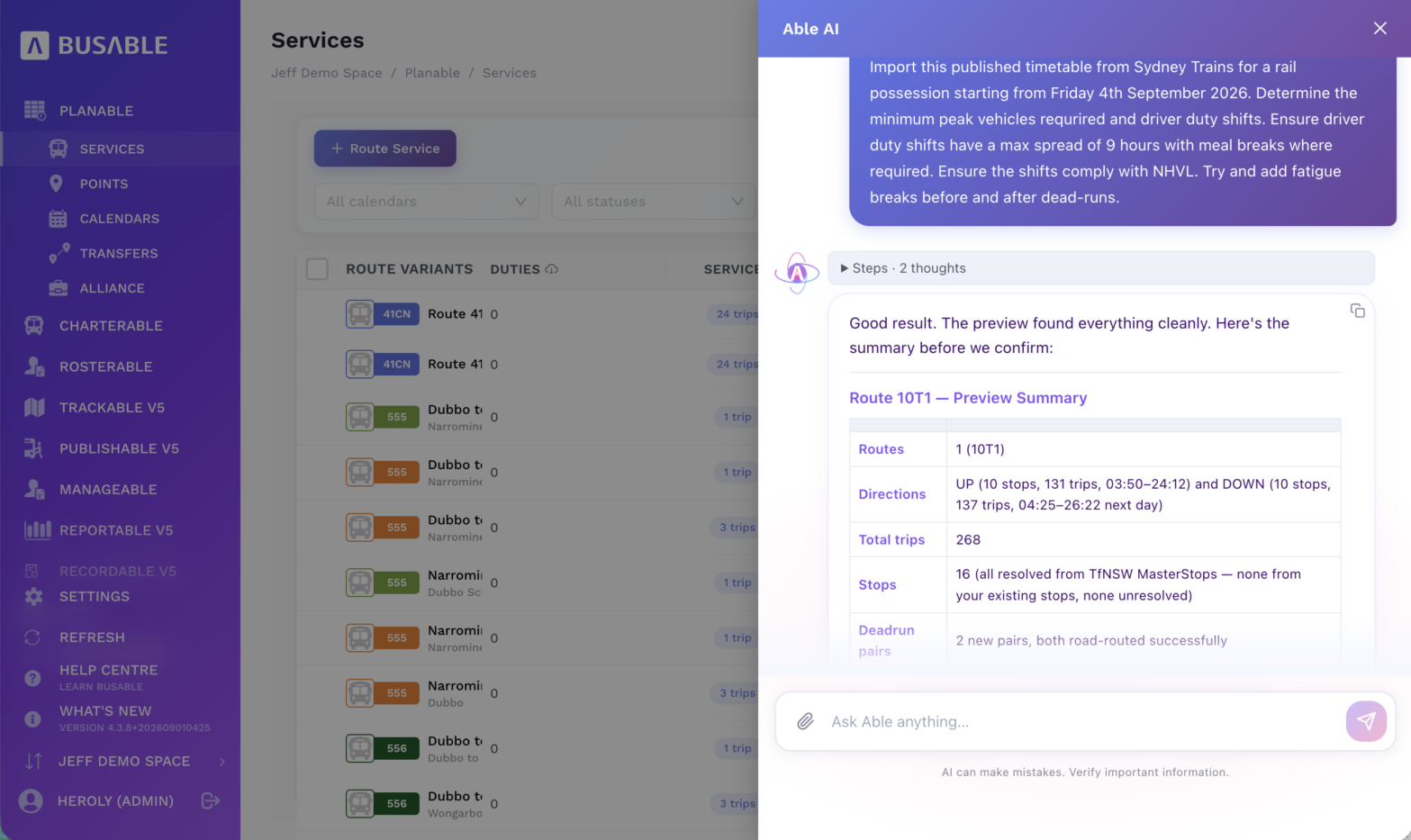
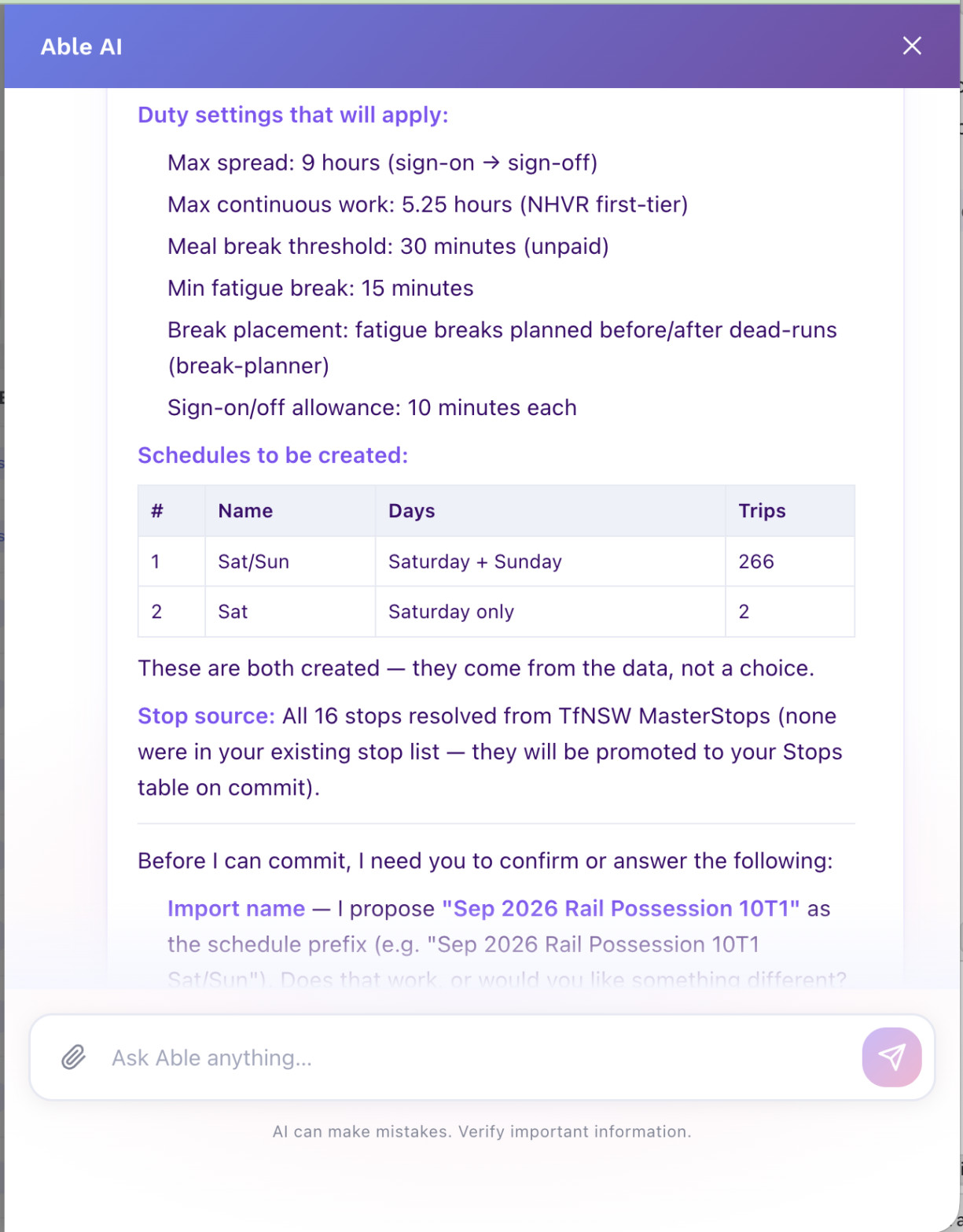
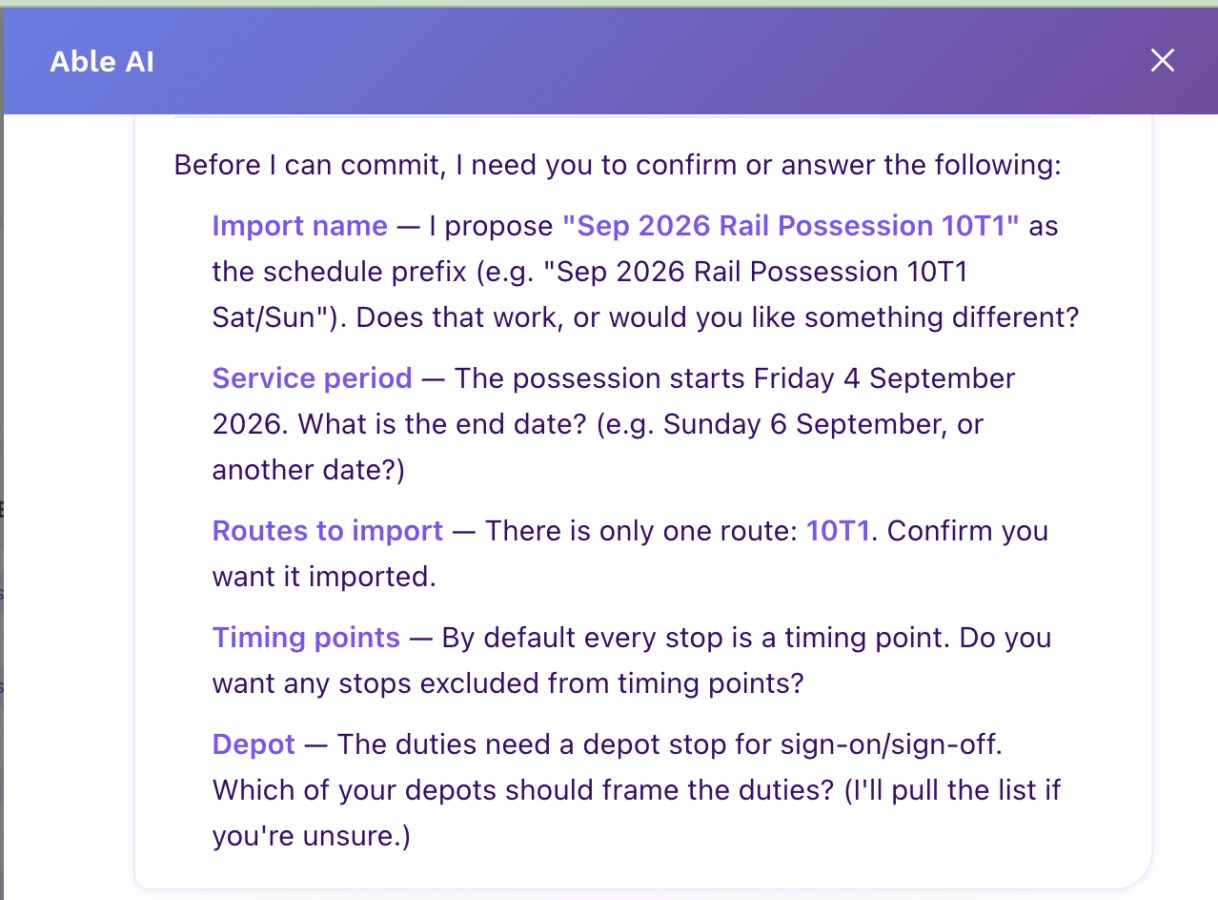
Able AI™ is trained on how a rail possession works and what a TODIS file needs. The operator hands it the published timetable, tells it which route and which dates, and it works through the detail: the trips, the stops, the calendar, the route path on the map, and a first cut of the driver duties against the shift limits the operator sets. It asks the operator to confirm as it goes, and asks for anything missing.
This is the part that used to hurt. One scheduler described the old method plainly: bringing the timetable in was the hard part, and it was typed in one line at a time. A possession of nine shifts was a full day's work. The import now runs in minutes. The same scheduler put it at about half the job cut out, and that was before we stopped asking operators to redo work the file does not even use.
The corridors are already built
Able AI draws the route path from TfNSW's own record of previous possessions on that line, segment by segment, rather than the operator drawing it on a blank map.
It is one dataset, not five spreadsheets
Route path, timetable, calendar, blocks and driver shifts are connected. Change the timetable and the driver shifts move with it.
The file is checked before it is submitted
Checked against the validation rules, and with a visual check of the route path on a map. Catching an error before submission takes minutes. Catching it after costs a processing cycle, and a processing cycle is often the whole margin you had.
And then you have to get paid: the Shift Trip Matrix
The TODIS file gets the service running. The Shift Trip Matrix, or STM, is how the operator gets paid for it.
The STM breaks the possession down shift by shift and trip by trip: the block, the day type, start and end times, durations, trip type, distance. TfNSW builds the claim on top of it — populate the STM tab correctly and the costing tabs fill themselves. Which is exactly why it is worth getting right, and exactly why it hurts to do by hand.
Done manually it is transposition work: reading your own duties off one document and retyping them into someone else’s template, hundreds of rows for a decent possession, with the format’s quirks to remember. Day types roll to the next day for trips starting after midnight, so a Sunday shift running into Monday morning costs to the right day. Breaks go against the block number rather than in a column of their own. Get a column wrong and the costing tabs quietly produce the wrong number.
The data is already in Busable, because it is the same data the duties were built from. Reportable™ holds the whole operation as one matrix — blocks, revenue trips, distance and hours, with pull-outs, dead running and revenue trips broken out and filterable — and the STM is assembled from that rather than typed a second time.
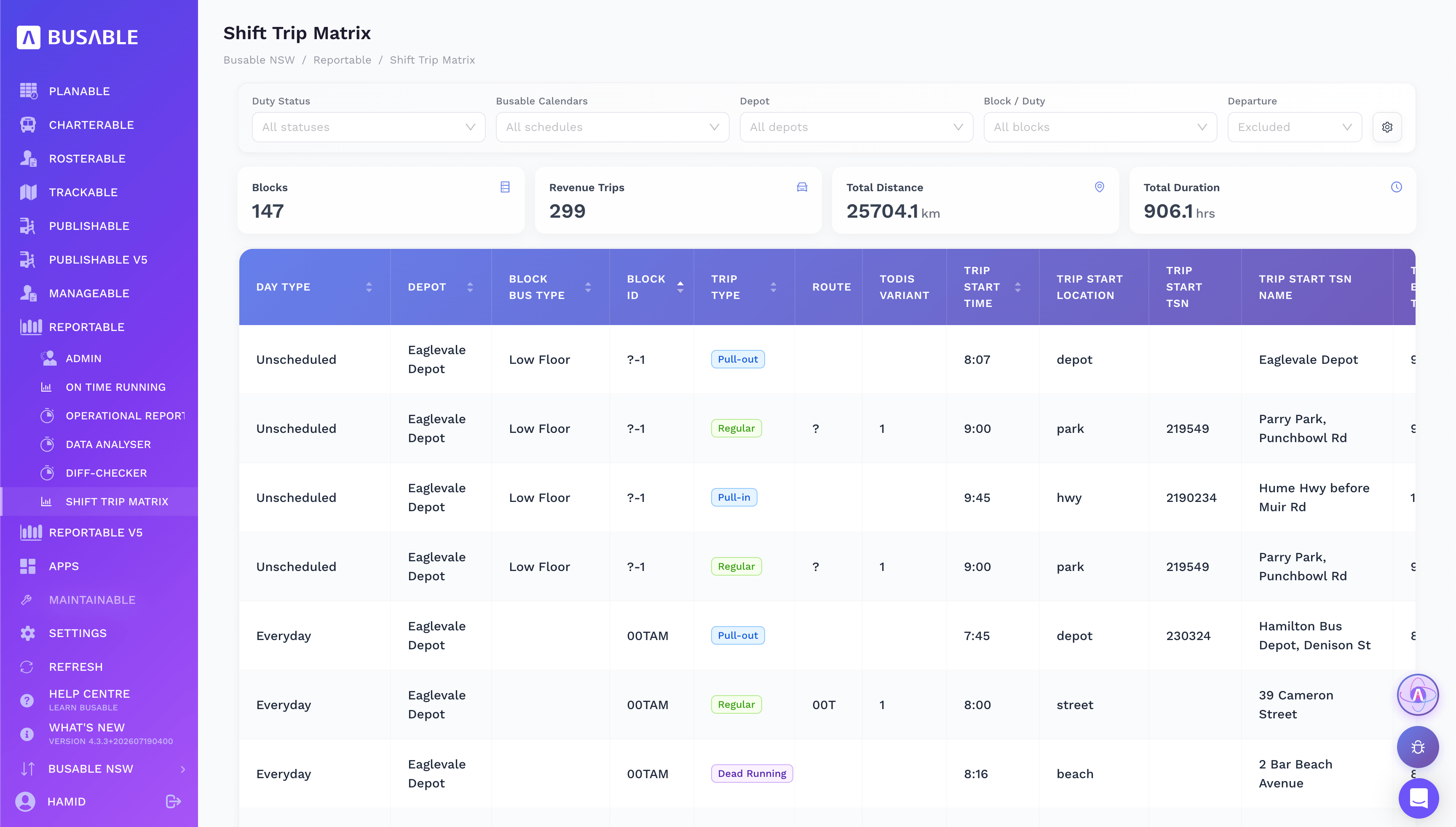
A matrix that was hours of spreadsheet work now takes roughly half an hour for a whole possession, and most of that is reviewing rows rather than typing them.
Two things worth being straight about. That half hour is our team producing the matrix from your Busable data as part of the CBC service, not you clicking a single button — the CBC-specific export is still being finished. And the same trap applies here as everywhere else in this work: the matrix is only as good as the duties behind it, so if the duty times were never corrected after a late change, the claim inherits the error.
Who is responsible for TODIS data accuracy?
The operator. Worth being precise about this, because it is the part that matters to anyone holding a contract.
Able AI does the legwork and puts the result in front of the operator. It does not sign anything off. The historical route data it draws on is TfNSW's, and it is not always current, so the operator checks the route path against the turn-by-turn file TfNSW issued and corrects it where the streets have changed. The operator confirms the trip counts, the operating days and the midnight crossovers. The operator reviews the driver duties against their own fatigue obligations and their own knowledge of what a driver can actually do, and adjusts them. Then the operator authorises the submission, which goes to TfNSW under their name and their accreditation.
Under heavy vehicle law the duty around driver fatigue, licensing and rostering sits with the operator and cannot be handed to a piece of software, and the data accuracy obligation in the contract sits with them too. What operators are buying back here is the hours of typing, not the judgement.
Why this matters to a transport agency
Speed here is not a software boast. It buys four things an agency needs.
Passenger information that is right. A validated TODIS file means the replacement service appears in the places passengers already look, with the actual stops and the actual times, and it is trackable in real time rather than a rumour.
Fewer people left to work it out themselves. Every service a passenger cannot look up becomes a phone call, a social post, a complaint, or a person who does not travel.
Accessibility. A passenger who relies on a screen reader, or who cannot get to a printed notice taped to a station wall, has no fallback when the data is missing. Good data is the accessible option.
A panel that can absorb late change. Handbacks and late requests are normal in this work, not exceptions. The value of a fast, repeatable data process is that a late change stays a data task instead of becoming an operational risk on the day.
Frequently asked questions
What does TODIS stand for?
Transport Operations Data Interchange Specification. It is the format used to submit bus service data to Transport for NSW.
Is a TODIS file required for rail replacement work?
Bussing requests issued under the Contingent Bussing Contract are marked as TODIS enabled where a file is required. Without an accepted file the service does not appear in TfNSW systems.
Are driver shifts required in a TODIS file?
Every trip must be associated with a shift for the file to import, but the route path, timetable and calendar are the substance of the submission.
How quickly can a TODIS file be produced?
Using Busable, CBC operators produce and submit a validated file within 24 hours of the request, and same day where the request arrives before the daily processing cut-off.
Can a software provider submit a TODIS file on an operator's behalf?
Yes, with written authority from the operator to TfNSW. The operator still reviews and authorises what is submitted, and it goes under their name and accreditation.
Who is accountable if TODIS data is wrong?
The operator. TfNSW places the data accuracy obligation on the operator, including the left and right turns in the route path.
What is the Shift Trip Matrix used for?
The Shift Trip Matrix is the shift-by-shift, trip-by-trip breakdown of a possession that TfNSW builds the payment claim from. Populate the STM tab correctly and the costing tabs populate from it.
How long does a Shift Trip Matrix take to produce?
Assembled from the duty data already in Busable, a whole possession takes roughly half an hour, most of it reviewing rows rather than typing them. Done by hand from scratch it is hours of transposition work.
How do rail replacement drivers get turn-by-turn directions?
From the navigation app TfNSW issues, running on the tablet in the bus. It is fed by the route file inside the TODIS submission, so the route path built and verified in Busable is the source data for what the driver sees on screen.
What happens if an operator has no accepted TODIS file?
They cannot use the TfNSW navigation app, because it has no route or trips to show for that service. The buses still run, but on paper run sheets or a third-party app instead of the government system.
How can passengers see where a rail replacement bus is?
The trips in the accepted TODIS file are what real-time information is matched against, so the replacement service can be tracked like any other service rather than only appearing on a printed notice.
Definitions
TODIS
Transport Operations Data Interchange Specification. The file format a bus operator uses to submit service data to Transport for NSW.
Contingent Bussing Contract (CBC)
The TfNSW panel arrangement under which operators are engaged to deliver rail replacement bus services.
Possession
A planned period in which Sydney Trains takes exclusive control of a section of track for engineering works, closing it to passenger trains.
Trackwork
The engineering activity carried out inside a possession.
Rail replacement service
The bus service that carries passengers along a corridor while a possession is active.
Bussing request
The request TfNSW issues to CBC panel operators setting out the corridor, timetable and shifts required for a possession.
Handback
Shifts or a whole job returned by an operator who can no longer cover it, then reallocated to another operator on the panel.
Shift Trip Matrix (STM)
The shift-by-shift, trip-by-trip breakdown an operator submits to TfNSW for costing a possession. Populating the STM correctly is what drives the costing tabs the payment claim is built on.
Route path
The turn-by-turn road alignment a bus follows between stops, as distinct from the list of stops itself. It is the source data for driver navigation, not just a description.
R file (route file)
The part of a TODIS submission carrying the route path with its left and right turns, plus the timetable. It is what feeds the driver navigation app TfNSW issues.
Driver console
The tablet in the bus running the navigation app TfNSW issues to rail replacement drivers. It works from the trips in the submitted file rather than from a driver shift.
Busable is Australian bus and coach operations software. We work with Contingent Bussing Contract operators on rail replacement scheduling and TODIS submission to Transport for NSW. See the rail replacement solution or book a walkthrough.