
Bus route optimisation software: what to look for
Every bus in a network costs a driver, fuel and a vehicle for as long as the service runs. Route optimisation software works out the routes and the number of buses a network really needs, so those costs are set by the work and not by how the routes happened to grow. This guide is for bus operators, school transport teams, councils and agencies choosing a tool, wherever they run.
What route optimisation software does
You give it the passengers or trips to carry, the vehicles you have and the rules you work to. It designs routes that carry everyone on time within those rules, uses as few vehicles as the work needs, and shows you what each option costs. The best tools then hand the chosen plan on to scheduling and rostering.
The problems it solves fall into three kinds, and a tool that is strong on one can be weak on another.
School runs. Many pickups, a handful of schools with fixed bells, an arrival window before each bell and a limit on how long a child rides. The savings come from sharing buses between schools and from shared stops.
Route services. Timetabled routes that connect with each other. The work is in timetables, transfers and turning vehicle blocks into driver duties.
On-demand services. An area and the trips people make inside it. The question is how many vehicles it takes to carry them.
Nine things to look for
Road travel times for buses, not straight lines. Distances on a map understate how long a bus takes. Ask whether travel times come from road data for buses, and whether routes respect the turns a bus can legally make. Otherwise the plan meets the bell on paper and misses it on the road.
Your rules held as limits. The longest ride, the arrival window, seats per bus and how far passengers walk to a stop should be limits the plan keeps, not preferences it trades away quietly. Check that the result tells you when a rule could not be met.
The fleet you actually run. Most fleets mix vehicle sizes, and many now include electric buses that charge at the depot. The software should plan with your vehicles, not an imaginary fleet of identical buses.
Morning and afternoon together. The fleet you need is set by the busiest moment of the day. A tool that plans one peak at a time can produce a morning that looks cheap and an afternoon that needs more buses.
Buses shared between schools and runs. Where bells or timetables are staggered, one bus can serve more than one school or route. This is where most fleet savings come from, so check the software can chain runs together.
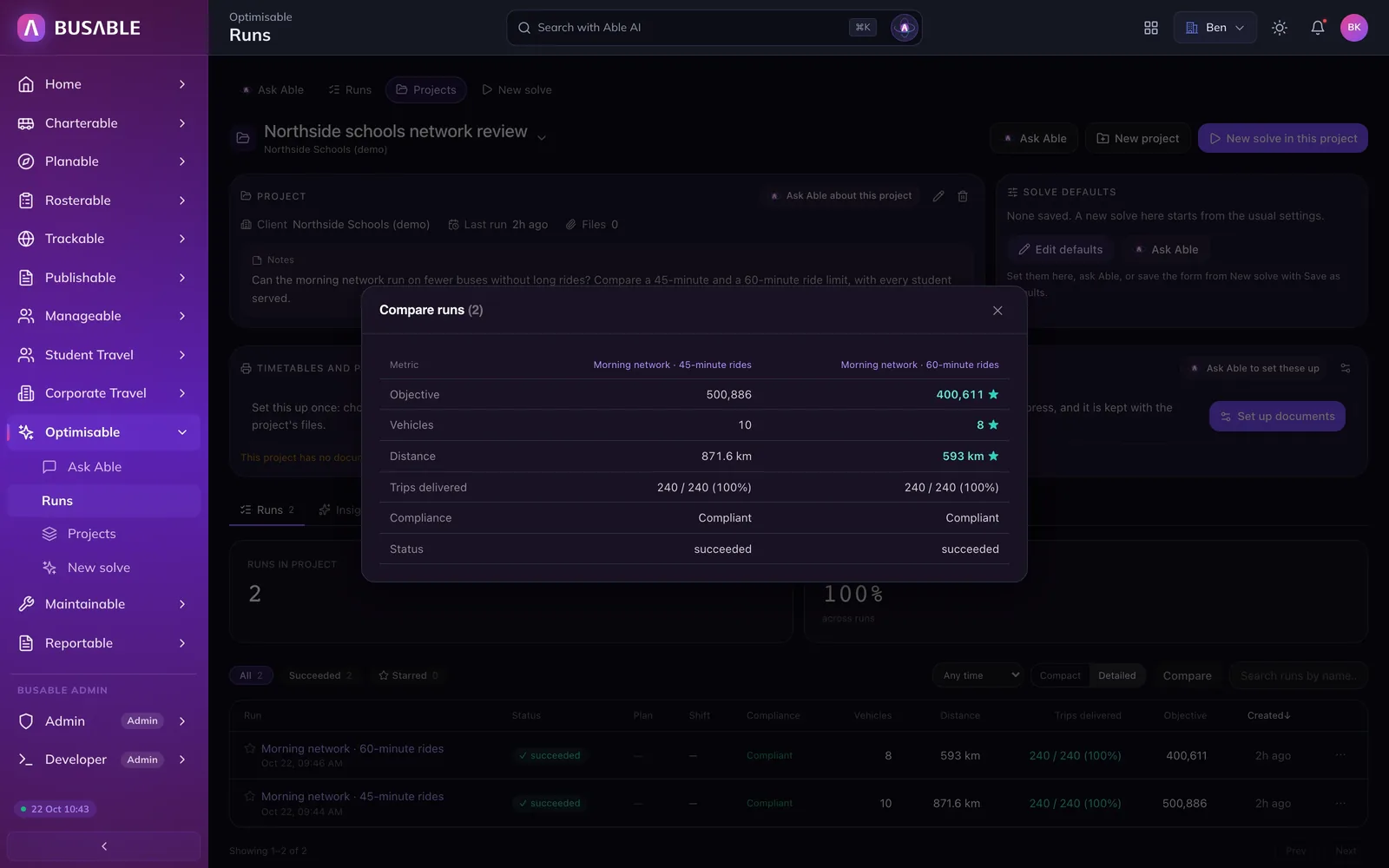
Options you can compare. One answer is not enough to make a decision. Look for side-by-side comparisons of fleet size, kilometres and ride times, and for what-if tests of a different ride limit or arrival window.
Starts from the data you have. Student and fleet lists usually live in spreadsheets, and timetables in GTFS. Software that needs weeks of data cleaning before the first result costs you the time it was meant to save.
A hand-off you control. The chosen plan should flow into scheduling and rostering as drafts a person reviews, not go live on its own. Driver duties carry fatigue and safety obligations that stay with the operator.
Exports and a record of the work. Results should export to GTFS and spreadsheets, and each study should be kept, so a contract review months later starts from the work already done.
Questions to ask before you buy
- Does it plan on road travel times for buses, and does it respect turns a bus cannot make?
- Which rules are hard limits, and what does it tell me when one cannot be met?
- Can it plan the morning and afternoon peaks together, with buses shared between schools?
- Can I compare several options side by side before I change anything?
- Can I start from spreadsheets, GTFS or my current system, and how long until the first result?
- Does the plan go into scheduling and rostering as drafts I review, or does it publish directly?
- Can I export the result, and is each study kept for later?
Where Optimisable fits
Optimisable is the route and fleet planning module of Busable, built first for school runs. It starts from the student list and fleet list you already keep, works out routes on road travel times for buses, holds your ride limit and arrival windows, and compares options side by side on buses, kilometres and trips delivered.
The plan you choose goes to Planable as draft routes and to Rosterable as duties ready to allocate, and nothing is published until you check it. For a worked example of what sets fleet size, read How many buses does a school run need?
Frequently asked questions
What is bus route optimisation software?
Software that works out the routes, the order of stops and the number of buses needed to carry every passenger on time, within limits such as the longest ride, the arrival window and the seats on each bus. It compares options so an operator, school district or council can see the cost of each before changing a service.
How is route optimisation different from scheduling software?
Route optimisation designs the network: which stops each bus serves, in what order, and how many buses that takes. Scheduling software turns a network into vehicle blocks, driver duties and rosters. The two work best connected, so the plan flows into scheduling without being typed in again.
Do I need GTFS data to use route optimisation software?
Not for school runs. A student list and a fleet list, usually spreadsheets, are enough. GTFS matters for timetabled route services, and a good tool exports to it so the result can be published.
Can route optimisation software plan electric buses?
It should. Electric buses have a range to respect and charge at the depot, so a tool that treats every vehicle as identical can produce routes an electric bus cannot finish. Ask how range and charging are handled.
Who uses bus route optimisation software?
Bus and coach operators running school contracts and route services, school districts and education departments planning student transport, councils and agencies designing on-demand services, and anyone pricing a tender who needs to know the fleet a contract requires.
Definitions
Route optimisation
Working out the routes, stop order and number of vehicles that carry every passenger on time, within the limits an operator sets, for the least cost.
Peak vehicle requirement
The number of vehicles on the road at the busiest moment of the day. It sets the fleet a service needs.
Arrival window
The time before a school bell or appointment in which a bus may arrive. A wider window lets one bus fit more pickups before it is due.
Ride time limit
The longest time any passenger should spend on the bus. A tighter limit means shorter routes and usually more of them.
Dead running
A movement with no passengers on board, such as a bus running from the depot to its first stop or between trips.
Vehicle block
The sequence of trips one vehicle runs in a day, from leaving the depot to returning, including the dead running between them.
See Optimisable on your own network
Send us your passenger and fleet lists and we will show you what it finds.
Book a demo