Back to platform
Busable · Optimisable™

Run only the buses you really need

Every bus you run without needing it costs a driver, fuel and a lease. Optimisable is bus route optimisation for school and route networks: it works out the routes and the fleet you need on real road times, so you see the saving before you change a thing.

Scroll to explore
01 · Overview

See what it does in ninety seconds

School runs, walking to stops, ride limits, the fleet you have, transfers and on-demand services, and how the plan you choose reaches the roster board.

Optimisable in ninety seconds

A narrated overview with captions. Press play to watch with sound.

Read the transcript

Meet Optimisable, from Busable. Planning bus routes by hand takes weeks. And even then, it's hard to know if you've found the best answer. Optimisable redesigns your whole network, again and again, and keeps the best layout it finds. For school runs, every student gets to school before the bell, and buses are shared between schools with different start times. Students walk a short way to a shared stop. You decide how far is too far. Set the longest time anyone should spend on the bus, and every route is built to stay under it. Use the fleet you actually have. Small vans, full-size buses, even electric. Each run gets the vehicle that suits it. Where changing buses makes the trip quicker, routes meet at a shared stop, timed so nobody is left waiting. Planning an on-demand service? Draw the area, add the trips people make, and see how many vehicles it really takes. Bidding for a contract? Compare your options side by side, and choose with confidence. When you're happy, the routes, timetables and driver duties go straight into Busable, ready to run. Optimisable. Plan it. Optimise it. Run it.
02 · Your data

Start from the lists you already keep

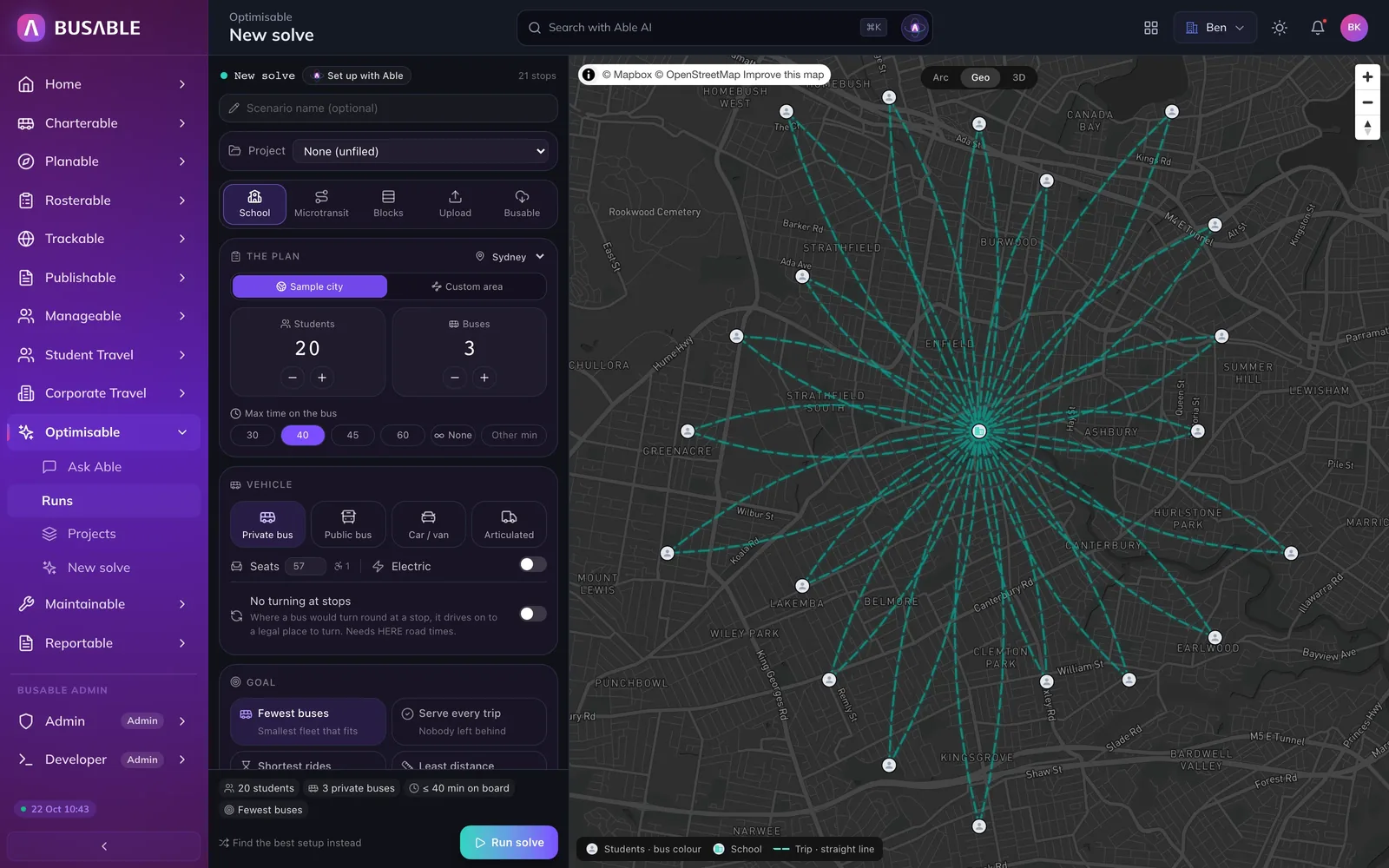
Load the student list and fleet list you already have as spreadsheets, or use the passengers, buses and network already in Busable. Set the longest ride you will accept and what matters most, fewer buses or shorter rides.

New solve form with the students, buses, ride limit and goal on the left and the students mapped around the school

Students, buses and your rules on one screen

The ride limit and the goal sit beside the students, mapped around the school.

03 · Routes

Routes a bus can drive, with every trip delivered

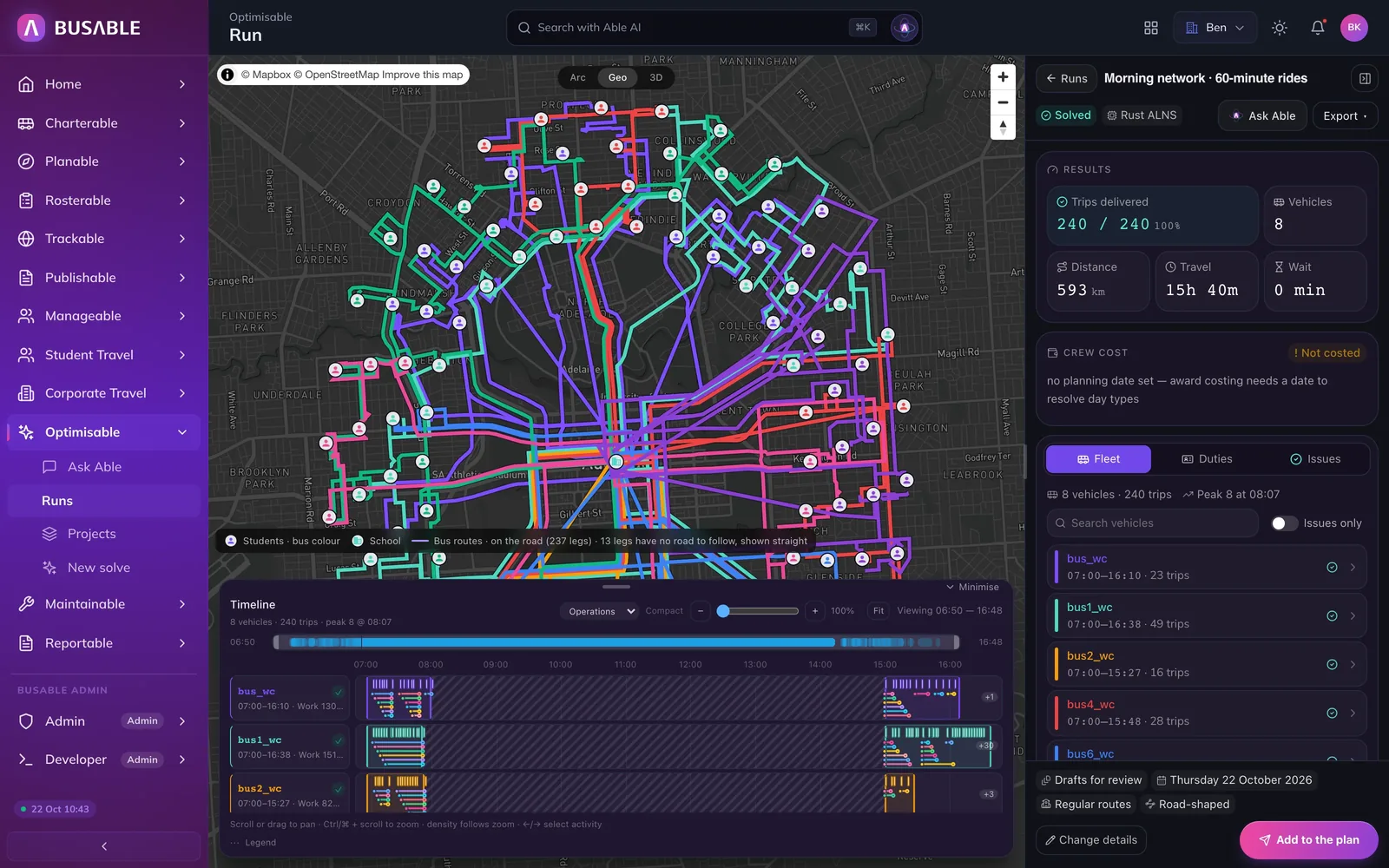
Routes are worked out on road travel times for buses, so the kilometres on screen are close to the kilometres you drive. Each bus gets its own colour on the map and its own line on the timeline.

Optimisable run result: bus routes drawn on the roads in one colour per bus, a timeline for each bus, and totals for trips delivered, vehicles and distance

Every trip covered, on the fewest buses

The trips delivered, the buses used and the kilometres driven, with each bus’s day laid out on the timeline.

04 · Compare

See what each option costs before you choose

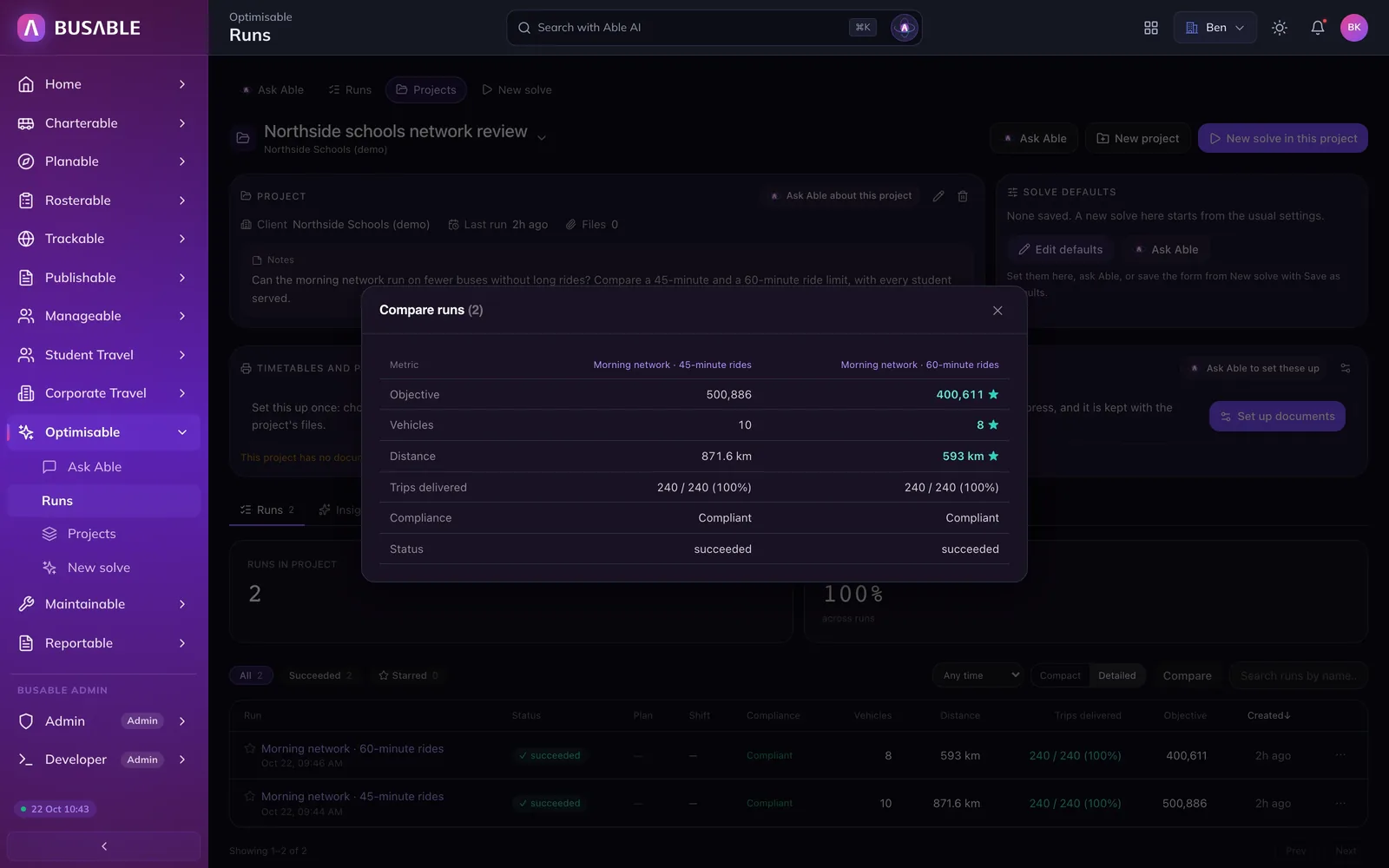
Change the ride limit, the bus sizes or the arrival window, then line the answers up side by side: buses, kilometres and trips delivered.

Two runs with different ride limits compared side by side on objective, vehicles, distance, trips delivered and compliance, with the better figure in each row starred

The trade-off on one screen

See how many buses and kilometres a shorter ride limit costs, with the better result in each row marked.

05 · Into Busable

The plan you choose goes straight to the roster board

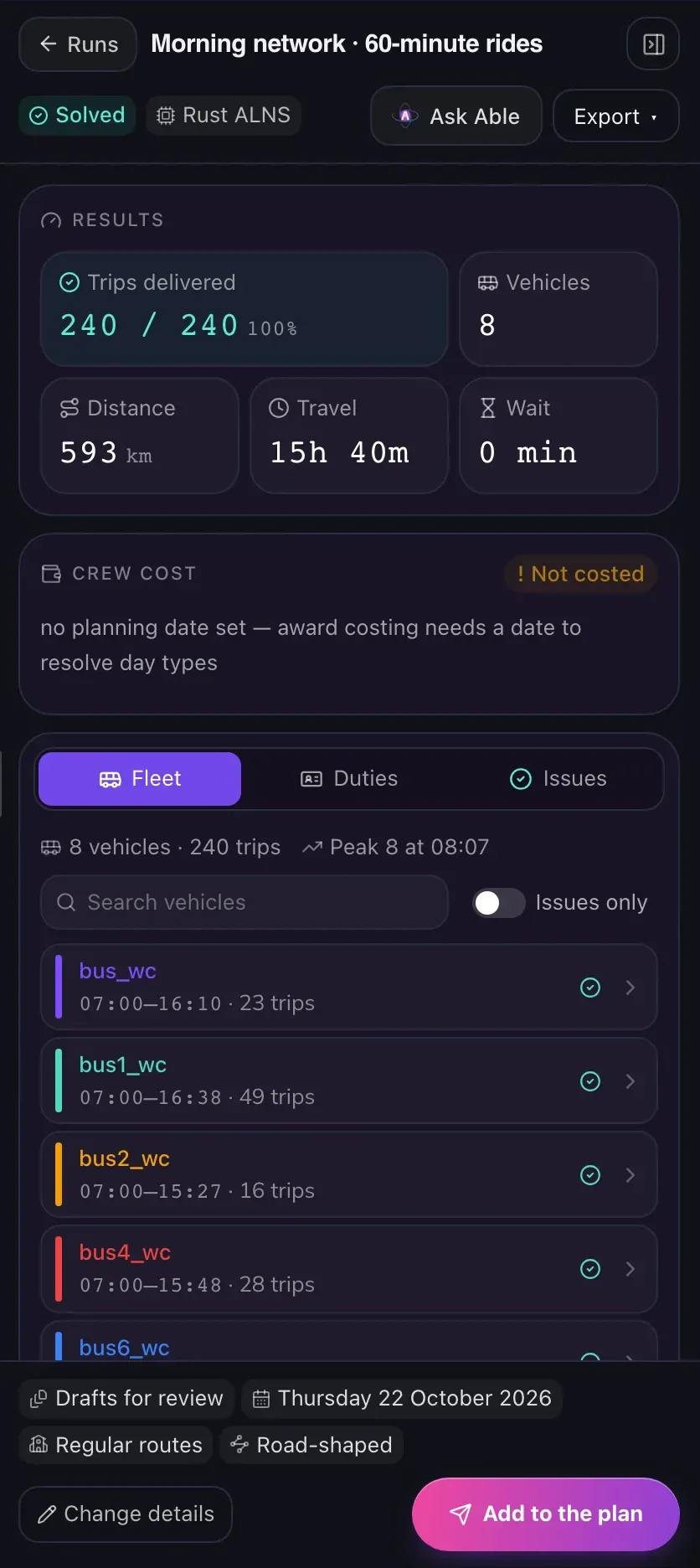
Add the plan and the routes go to Planable™ as drafts and the duties to Rosterable™, ready to allocate. Nothing is published until you check it.

The results panel of a solved run: totals for trips delivered, vehicles and distance, the vehicle list, the labels Drafts for review and Road-shaped, and the Add to the plan button

Drafts for review, one press away

The run is marked as drafts for review, and Add to the plan sends it to Planable and Rosterable.

06 · Projects

Come back to a review and pick up where you left off

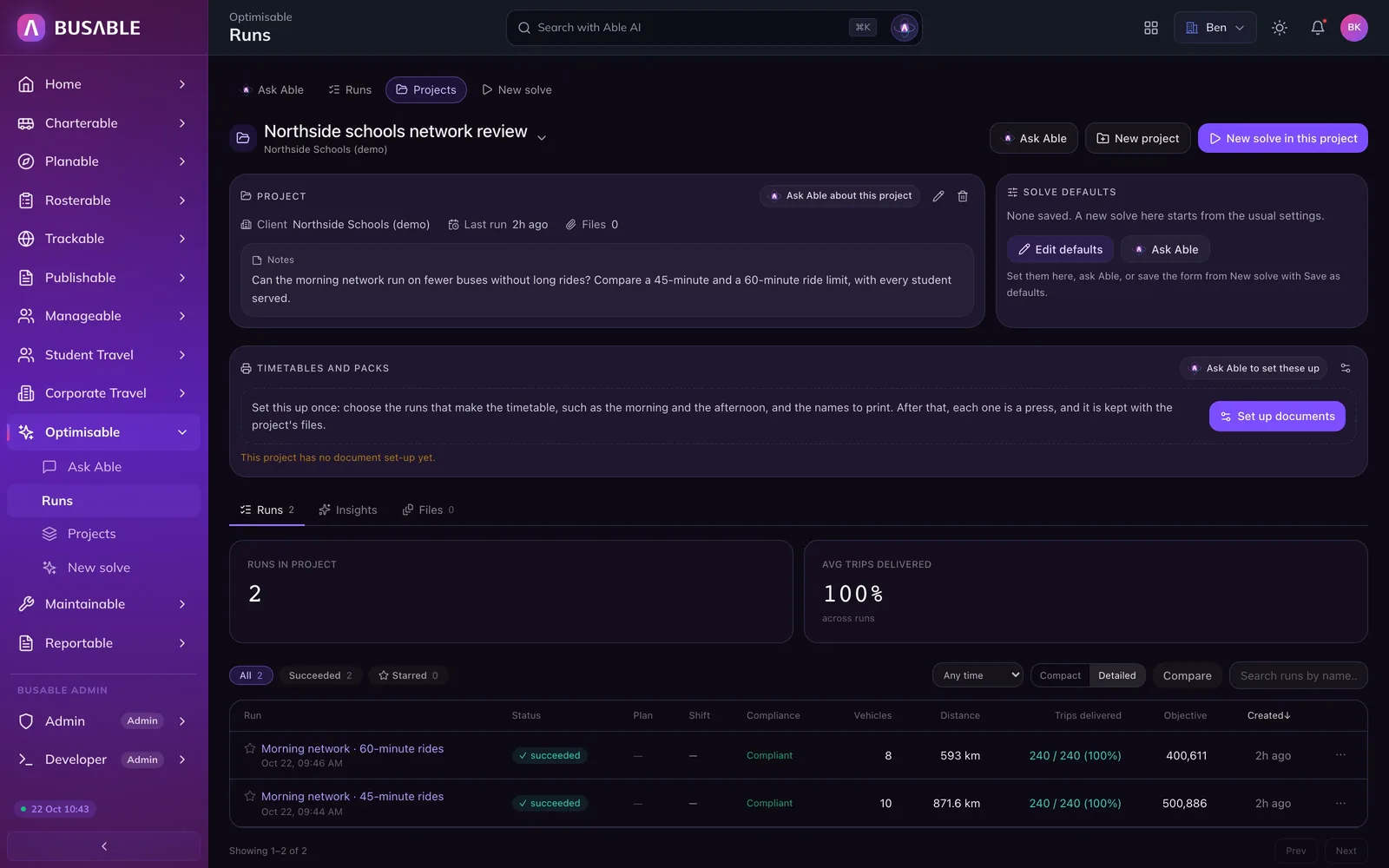
Each project keeps its runs, documents and notes together, and runs do not expire. A contract review months later starts from the work you already did.

Optimisable project page with its client, notes and the runs filed in it

One project for each review

The client, the question you asked and every run you tried, in one place.

Common questions

What is Optimisable?

Optimisable is the route and fleet planning module of Busable, software for bus and coach operators. It works out the routes and the number of buses a school or route network needs on road travel times for buses, and sends the plan you choose to Planable and Rosterable as drafts.

How does Optimisable work out how many buses I need?

It builds routes that carry every trip inside its arrival time and under the longest ride you allow, then drops every bus the work does not need. Change the ride limit, the bus sizes or the arrival window and compare the answers side by side.

Does Optimisable plan on real roads or straight lines?

Real roads. Travel times and route lines come from road data for buses, and where a bus cannot turn at a stop it drives on to a legal turning place, so the kilometres you see are close to the kilometres you drive.

Can schools with different bell times share buses?

Yes. Each school keeps its own bell and arrival window, and a bus can run for more than one school when the times allow, so schools with staggered bells can share buses.

Can Optimisable help with a contract tender?

Yes. It shows the buses, kilometres and driving time a network needs, and a sweep tests fleet size, seats per bus, ride limit and arrival window together and ranks the results, so you know what the contract needs before you bid.

Can it turn my existing vehicle blocks into driver duties?

Yes. Keep your existing blocks and have them cut into draft driver duties under your award, union agreement or company rules, with meal breaks, maximum spread and broken shifts respected. You review the duties and allocate the drivers.

What do I need to get started with Optimisable?

A list of the trips or students to carry and a list of your buses. Spreadsheets in CSV or Excel work, or Optimisable can use the passengers, fleet and network already in Busable.

Does Optimisable change anything in Busable on its own?

No. A plan is added to Planable as draft routes and to Rosterable as duties waiting to be allocated, and nothing is published until you review it.

Can I export the results?

Yes. Any result downloads as a CSV file, an Excel workbook or a GTFS feed.

Optimisable

See Optimisable on your own network

Send us your student list and fleet list and we will show you what it finds.

Book a demo